Portfolio

Khairuramdhani

AI/ML Engineer, Mobile Developer & Mechanical Designer

Computer Vision • LLM • Embedded Systems (C++) • Mobile Development (Flutter) • Mechanical & 3D Design

Universitas Brawijaya Computer Engineering
Universitas BrawijayaTeknik Komputer ID
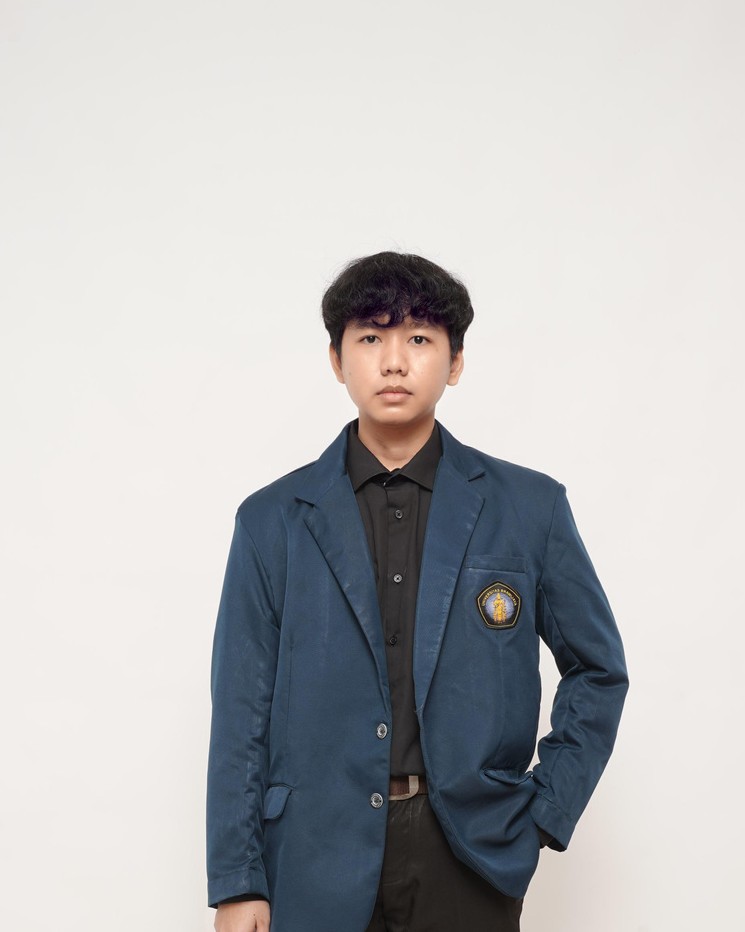
Portrait of Khairuramdhani
Khairuramdhani AI/ML · Mobile · Mechanical & 3D Design

About me

Turning research and code into working devices.

I am a final-year Computer Engineering student at Universitas Brawijaya. My main field is AI, especially computer vision, and I have also worked with large language models. I enjoy research as much as building. I usually take a project all the way to a device people can use, from preparing the data and training the model to building the app in Flutter. I mostly use Python and C++. Outside AI, I also work on embedded systems and mechanical design in Fusion 360.

Saya mahasiswa tingkat akhir Teknik Komputer di Universitas Brawijaya. Bidang yang paling saya tekuni adalah AI, terutama computer vision, dan saya juga pernah bekerja dengan LLM. Selain membangun, saya juga suka melakukan riset. Hampir semua proyek saya kerjakan sampai bisa dipakai di perangkat, mulai dari menyiapkan data dan melatih model sampai membuat aplikasinya dengan Flutter. Saya paling sering memakai Python dan C++. Di luar AI, saya juga mengerjakan sistem tertanam dan desain mekanik di Fusion 360.

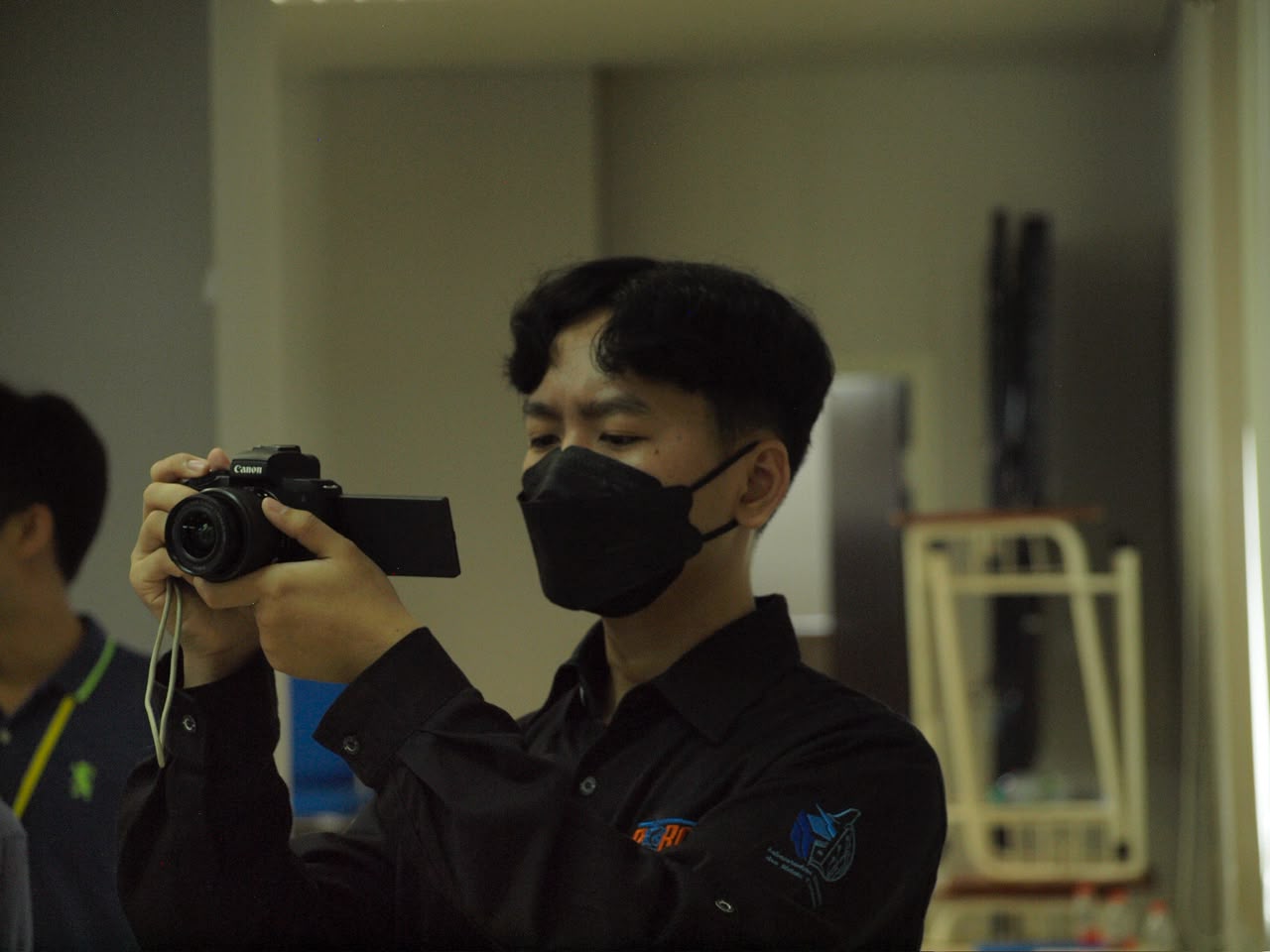
Khairuramdhani taking a photo with a Canon mirrorless camera
Behind the lens

Outside engineering, I enjoy photography. I was on the documentation committee for Robin, and I often take the photos at organisational events. Di luar teknik, saya suka fotografi. Saya pernah menjadi panitia dokumentasi acara Robin dan sering memotret di kegiatan organisasi.

8 End-to-end projects
4 Core technologies · AI · C++ · Flutter · CAD
2 Teaching assistant roles
7 Certifications

Technical skills

What I work with.

Programming Languages

  • Python
  • C++
  • Dart
  • JavaScript

AI / Machine Learning

  • PyTorch
  • TensorFlow
  • scikit-learn
  • Ultralytics
  • YOLO
  • CNN
  • SVM
  • LLM fine-tuning (LoRA)

Computer Vision

  • OpenCV
  • Real-time detection
  • Image segmentation
  • On-device (TF Lite)

Mobile Development

  • Flutter
  • Firebase
  • UI/UX

Embedded / IoT

  • C++
  • Arduino
  • ESP32
  • FreeRTOS
  • Sensors
  • RTC

Mechanical Design & CAD

  • Autodesk Fusion 360
  • 3D Design
  • Sheet Metal Design
  • CAD
  • Technical Drawing

Data & Analysis

  • SQL
  • pandas
  • NumPy
  • matplotlib
  • seaborn
  • EDA

Tools & Workflow

  • Git
  • Linux
  • Anaconda
  • Weights & Biases
  • GitHub Actions

Languages

  • Indonesian (native)
  • English (currently improving)

Experience

Building and teaching.

  1. Feb 2026 – Jun 2026

    AI Engineer Intern AITF

    Ministry of Communications & Digital Affairs (Komdigi) × Universitas Brawijaya

    A national internship program in AI engineering, run by Indonesia's Ministry of Communications and Digital Affairs (Komdigi) together with Universitas Brawijaya.

    • Built a semi-automatic data annotation pipeline with Vision-Language Models to reduce manual labelling
    • Built end-to-end deep learning pipelines for computer vision, from data preparation to training and evaluation
    • Fine-tuned and optimised large language models through parameter tuning and prompt engineering
    • Worked in a national AI research team with members from several institutions
    • Vision-Language Models
    • LLM fine-tuning
    • Deep Learning
    • Computer Vision
    • Python
    • PyTorch
    • Prompt Engineering
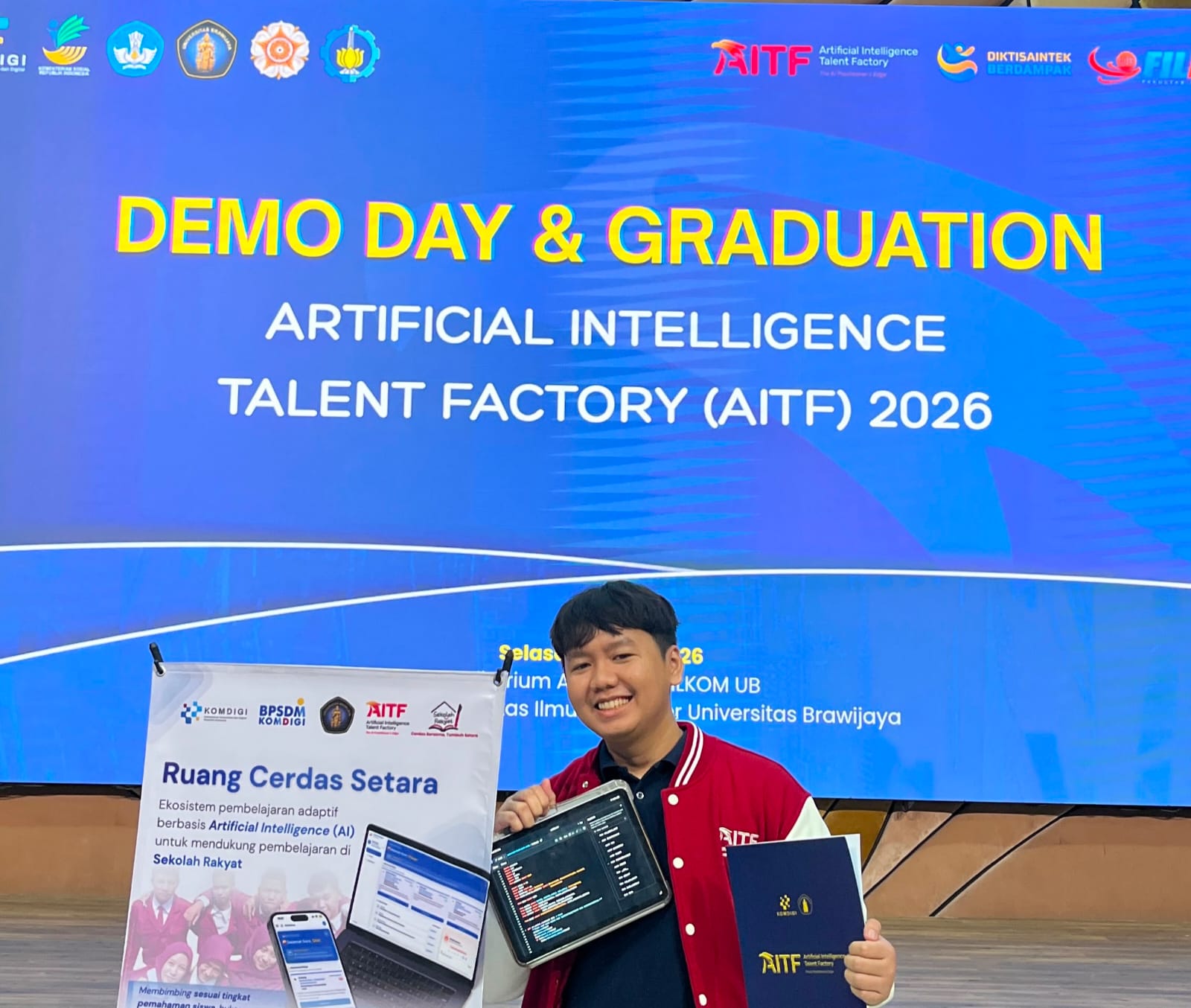
    Khairuramdhani at the AITF Demo Day & Graduation, holding his team's project
    Demo Day and graduation · AITF 2026
  2. Even semester 2024/2025

    Teaching Assistant · Data Structures and Algorithms

    Faculty of Computer Science, Universitas Brawijaya

    Led C++ lab sessions on data structures and algorithms and checked students' assignments.

  3. Odd semester 2024/2025

    Teaching Assistant · Basic Programming

    Faculty of Computer Science, Universitas Brawijaya

    Guided first-year students through basic programming in lab sessions and gave feedback on their assignments.

Selected projects

Projects

AI, computer vision, embedded systems, and mobile appsAI, computer vision, sistem tertanam, dan aplikasi mobile

Project 01 MVP · Working Prototype

PANDAI

Plant Identification with Artificial Intelligence

PANDAI logo PANDAI Plant Identification with Artificial Intelligence Flutter and TensorFlow Lite
App demo · opening, plant scan, and herbarium

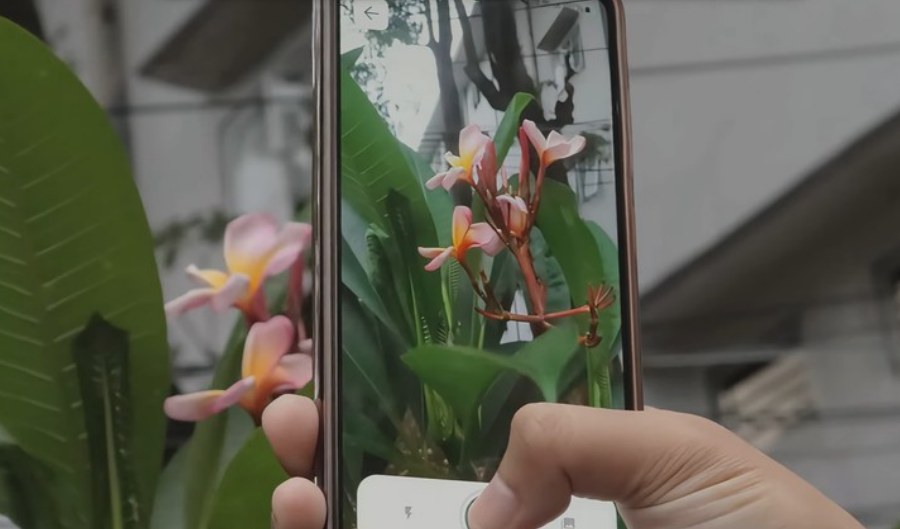
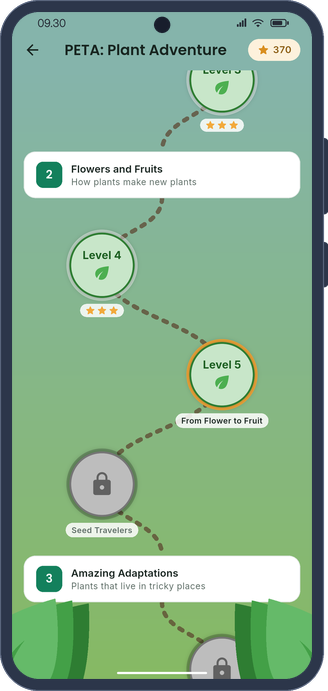
PANDAI helps primary-school students learn about plants. Students point the camera at a plant, and the app tells them what it is. Identified plants go into their collection, and there are also puzzles and an adventure map to learn from. Identification runs offline with MobileNet and TensorFlow Lite. The app is a working Android MVP. Accounts and progress are stored on the phone for now. Online sync with Firebase and class rankings with Supabase are planned. The project supports SDG 4 and SDG 15.

PANDAI membantu siswa SD belajar mengenal tanaman. Siswa cukup mengarahkan kamera ke tanaman, lalu aplikasi menunjukkan nama tanaman itu. Tanaman yang sudah dikenali masuk ke koleksi, dan ada juga puzzle serta peta petualangan untuk belajar. Identifikasi berjalan offline dengan MobileNet dan TensorFlow Lite. Aplikasi ini sudah berupa MVP Android yang berfungsi. Untuk sekarang, akun dan progres disimpan di ponsel. Sinkronisasi akun dengan Firebase dan peringkat kelas dengan Supabase masih direncanakan. Proyek ini mendukung SDG 4 dan SDG 15.

  • Identifies plants offline with MobileNet and TensorFlow Lite
  • Plant guide, collection, and learning games
  • Accounts and progress stay on the device; online sync is planned
  • Flutter
  • Dart
  • MobileNet
  • TensorFlow Lite
  • Local storage
  • Python
  • PyTorch
github.com/khaichi11/Mobile-APP-Plant-Detection-Mobilenet

App screenshots · Tangkapan layar aplikasi
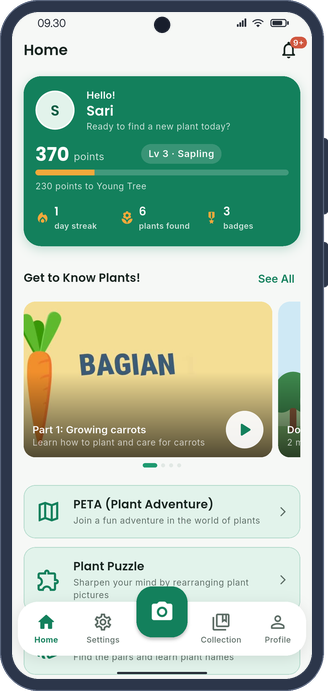
PANDAI home screen with plant-learning activities
Home and learning
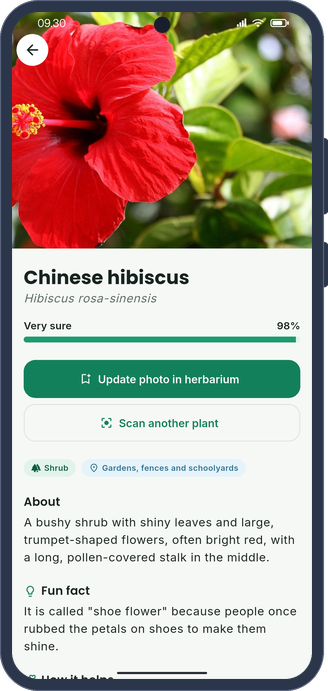
PANDAI plant identification result
Identification result
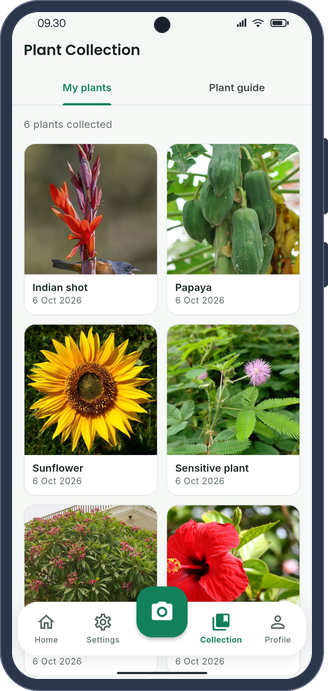
PANDAI saved plant collection
Plant collection
PANDAI Plant Adventure map
Plant Adventure

Photographing a real plant · Memotret tanaman sungguhan

PANDAI camera being used to photograph a real plant
Scanning a plant outdoors with the PANDAI camera · Memindai tanaman di luar ruangan dengan kamera PANDAI

PANDAI walkthrough · Video panduan PANDAI

Project 02 On-device AI · Offline

MEIRA

Multimodal Eating Intelligence & Recipe Assistant

MEIRA logo MEIRA Multimodal Eating Intelligence & Recipe Assistant Flutter and on-device AI
App demo · opening, ingredient markers, and nutrition

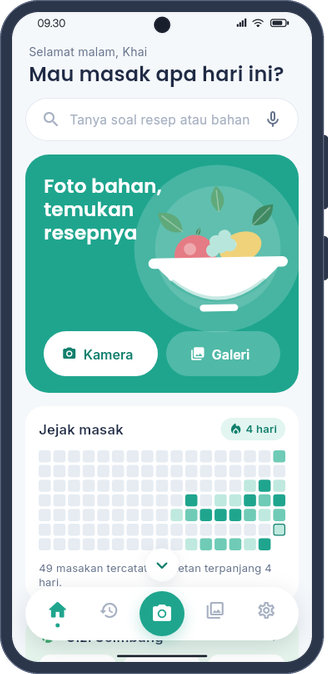
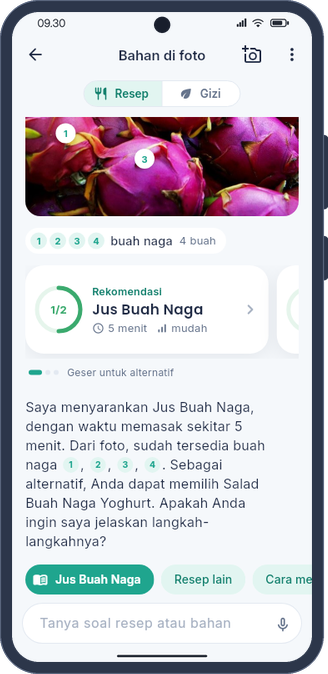
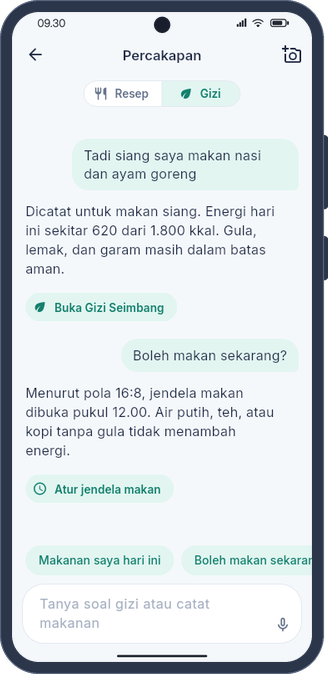
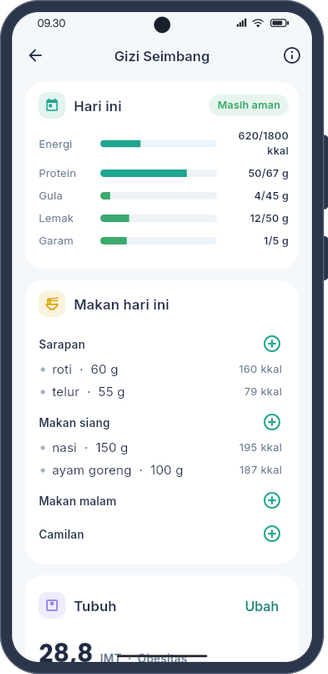
MEIRA is a cooking and nutrition assistant for Android that works without internet. Users take a photo of the ingredients they have. The app marks each ingredient with a number, reads the text on packages and nutrition labels, and suggests recipes from a collection of 286. Users can also ask questions by typing or speaking. The answers only use the app's own data, namely kitchen notes, the recipe book, and food data from Wikidata and USDA. The Gizi Seimbang section has a body calculator, a meal log checked against daily limits, weight tracking, and an eating window with reminders. The models behind it are D-FINE for 132 ingredient classes, PP-OCRv5 for reading text, and Qwen3.5-0.8B with a 22 MB LoRA adapter for answering. All models run on the phone, so no data leaves the device.

MEIRA adalah asisten masak dan gizi untuk Android yang bekerja tanpa internet. Pengguna cukup memotret bahan yang dimiliki. Aplikasi memberi nomor pada setiap bahan, membaca tulisan pada kemasan dan label gizi, lalu menyarankan resep dari 286 resep yang tersimpan. Pengguna juga bisa bertanya lewat ketikan atau suara. Jawabannya hanya diambil dari data di dalam aplikasi, yaitu catatan dapur, buku resep, serta data makanan dari Wikidata dan USDA. Bagian Gizi Seimbang berisi kalkulator tubuh, catatan makan yang dibandingkan dengan batas harian, pemantauan berat badan, dan jendela makan dengan pengingat. Model yang dipakai adalah D-FINE untuk 132 jenis bahan, PP-OCRv5 untuk membaca teks, dan Qwen3.5-0.8B dengan adaptor LoRA 22 MB untuk menjawab. Semua model berjalan di ponsel, jadi tidak ada data yang keluar dari perangkat.

  • D-FINE detector trained on 17,265 photos from Open Images, LVIS, and Wikimedia Commons, shipped inside the APK and run with ONNX Runtime
  • LoRA chat adapter for Qwen3.5-0.8B that raised fact-based accuracy from 0.67 to 0.97 on held-out questions
  • Reads nutrition labels, logs meals and weight from the chat, and declines off-topic requests
  • Flutter
  • Dart
  • D-FINE
  • PP-OCRv5
  • ONNX Runtime
  • llama.cpp
  • Qwen3.5
  • LoRA
  • Whisper
  • PyTorch
github.com/khaichi11/MEIRA

App screenshots · Tangkapan layar aplikasi
MEIRA home screen with the ask field, camera and gallery buttons, and the cooking streak grid
Home and cooking streak
MEIRA chat with numbered markers on dragon fruit and a recommended recipe
Numbered markers
MEIRA nutrition chat recording a meal and answering from the eating window
Nutrition chat
Gizi Seimbang screen with today's intake against daily limits and the meal log
Gizi Seimbang
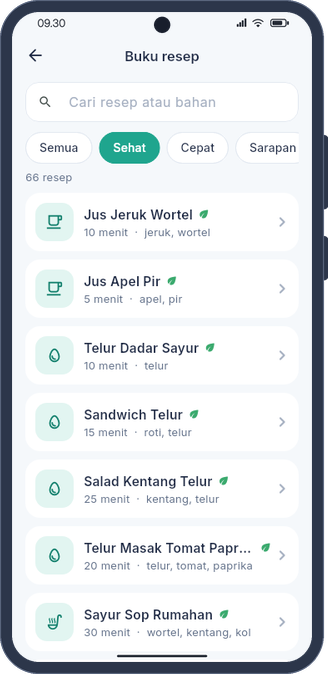
MEIRA recipe book filtered to lighter recipes
Recipe book

Project 03

CERDAS

Cheating Examination Recognition & Detection · YOLO-based AI System

CERDAS logo CERDAS Cheating Examination Recognition & Detection YOLO-based AI System
App demo · scan opening and exam session

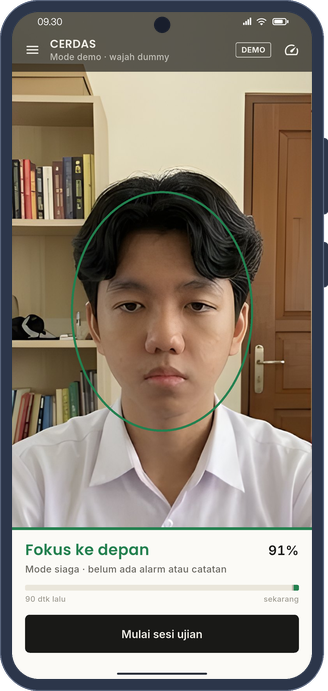
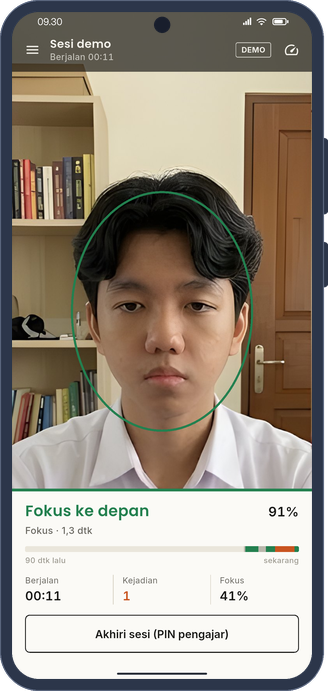
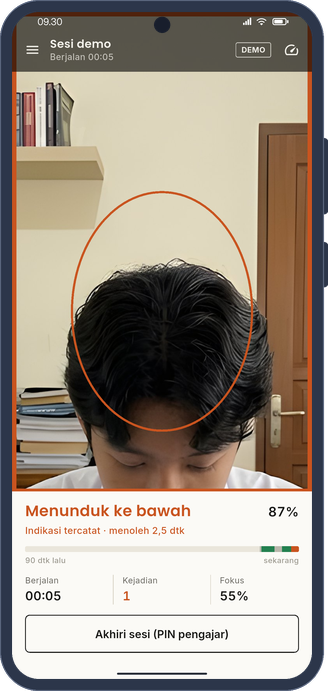
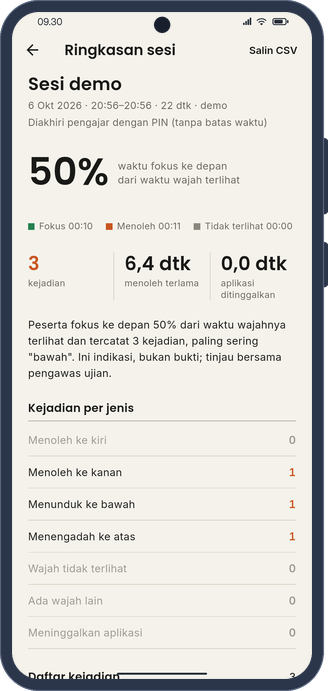
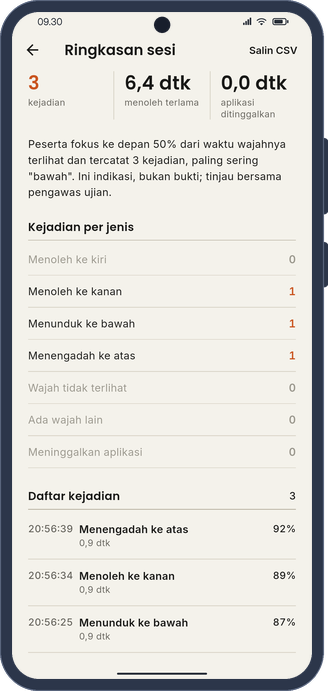
CERDAS helps proctors monitor exams with an Android phone. The app follows the direction of a student's head: front, up, down, left, or right. If a student looks away for too long, the app marks it as a possible sign of cheating, not as proof. Detection uses a YOLOv12n model and runs on the phone without internet. Camera frames are not stored or sent anywhere, and session records stay on the device. Performance depends on the phone.

CERDAS membantu pengawas memantau ujian dengan ponsel Android. Aplikasi ini memantau arah kepala peserta, yaitu depan, atas, bawah, kiri, atau kanan. Jika peserta menoleh terlalu lama, aplikasi menandainya sebagai indikasi kecurangan, bukan bukti. Deteksi memakai model YOLOv12n dan berjalan di ponsel tanpa internet. Gambar kamera tidak disimpan atau dikirim ke mana pun, dan catatan sesi tetap berada di perangkat. Kinerjanya bergantung pada ponsel yang dipakai.

  • Real-time YOLOv12n inference on Android with LiteRT
  • Five head directions, without gaze tracking
  • Camera frames stay private and session history stays on the device
  • Python
  • Ultralytics
  • YOLOv12n
  • Flutter
  • Dart
  • LiteRT
  • Android
github.com/khaichi11/Mobile-Cheating-Detection-YOLO

App screenshots · Tangkapan layar aplikasi
CERDAS standby screen
Standby
CERDAS monitoring a focused exam session
Focused session
CERDAS warning during a sustained head turn
Head-turn warning
CERDAS exam session summary
Session summary
CERDAS summary of recorded exam events
Event summary

Project 04

FishFeed

Automatic Fish-Feeding System · Embedded & IoT

FishFeed logo FishFeed Automatic fish feeder ESP32 and Flutter
App demo · aquarium opening and feeding

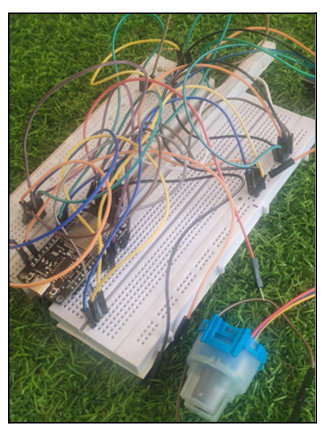
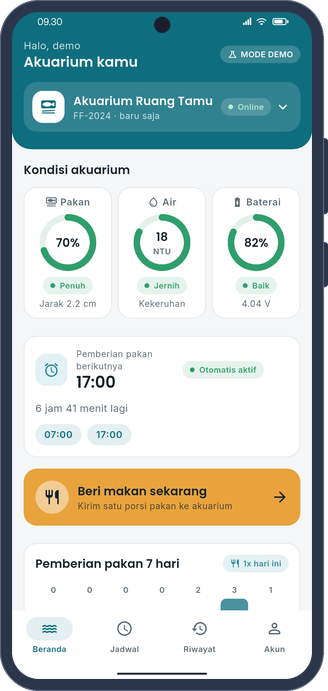
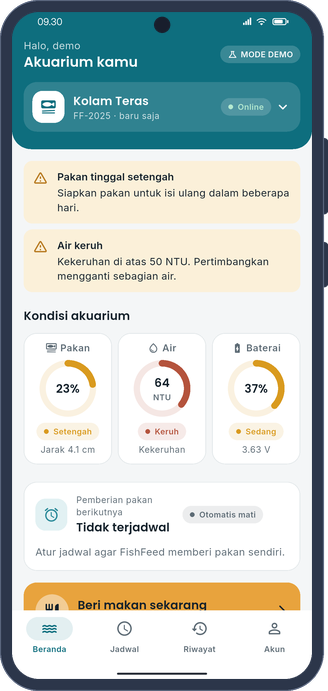
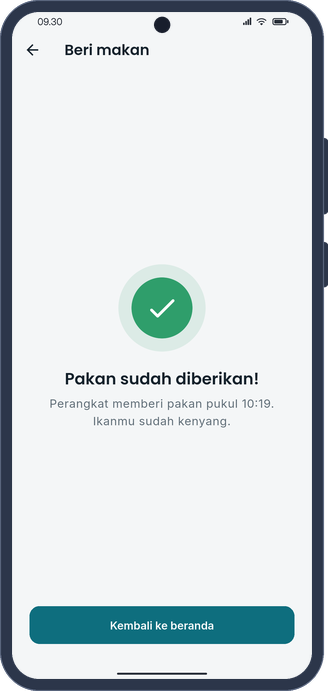
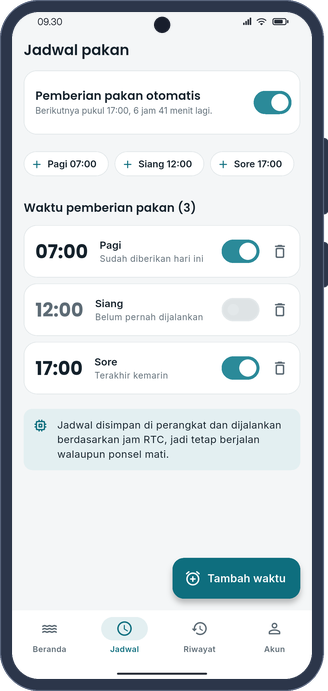
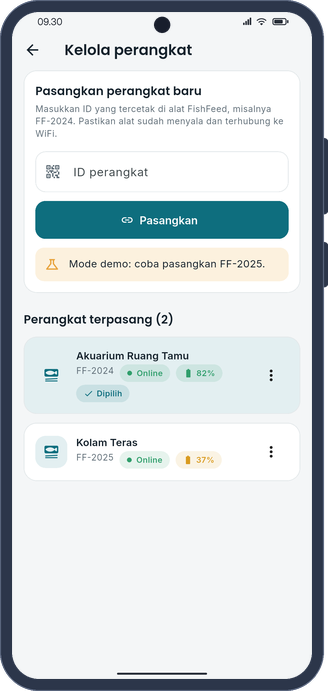
FishFeed is an automatic fish feeder for aquariums. It feeds the fish on a set schedule and monitors the tank with an ultrasonic sensor and a turbidity sensor. The device uses an ESP32 with C++ firmware built on Arduino and FreeRTOS, and an RTC keeps the schedule on time. Users can monitor and control it from a Flutter app connected to Firebase. A demo mode simulates the device, so the app can be tried without hardware.

FishFeed adalah alat pemberi pakan ikan otomatis untuk akuarium. Alat ini memberi pakan sesuai jadwal dan memantau akuarium dengan sensor ultrasonik dan sensor kekeruhan. Perangkatnya memakai ESP32 dengan firmware C++ berbasis Arduino dan FreeRTOS, dan RTC menjaga jadwalnya tetap tepat. Pengguna bisa memantau dan mengatur alat dari aplikasi Flutter yang terhubung ke Firebase. Ada juga mode demo yang menyimulasikan perangkat, jadi aplikasi bisa dicoba tanpa alat.

  • C++ firmware on ESP32 with FreeRTOS multitasking
  • Remote monitoring and feeding schedules through Firebase
  • Demo mode with a simulated device, no setup needed
  • C++
  • Arduino
  • ESP32
  • FreeRTOS
  • Sensors
  • RTC
  • Flutter
  • Firebase
github.com/khaichi11/Aplikasi-Sistem-Tertanam-FishFeed

Hardware documentation · Dokumentasi perangkat

Real FishFeed ESP32 and sensor wiring on a breadboard
The actual wiring
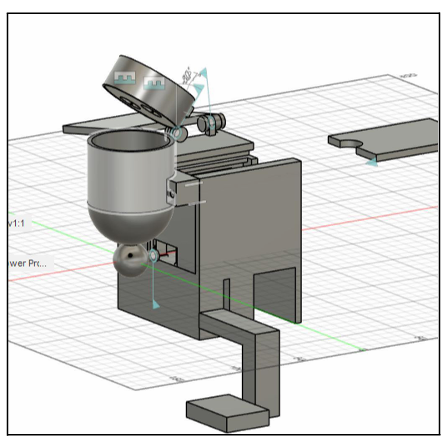
FishFeed feeder enclosure designed in Fusion 360
3D mechanical design
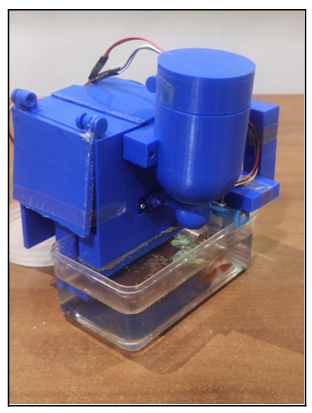
Assembled 3D-printed FishFeed device
3D-printed device

App screenshots · Tangkapan layar aplikasi
FishFeed dashboard in demo mode
Dashboard · demo mode
FishFeed aquarium alerts in demo mode
Alerts · demo mode
FishFeed feeding confirmation in demo mode
Feeding · demo mode
FishFeed feeding schedule in demo mode
Schedule · demo mode
FishFeed device management in demo mode
Device management · demo mode

Project 05

Buah-Seru

Fruit-Recognition Educational App for Children

Buah-Seru logo Buah-Seru Fruit-guessing quiz for children On-device CNN in Flutter
App demo · curtain opening and guessing game

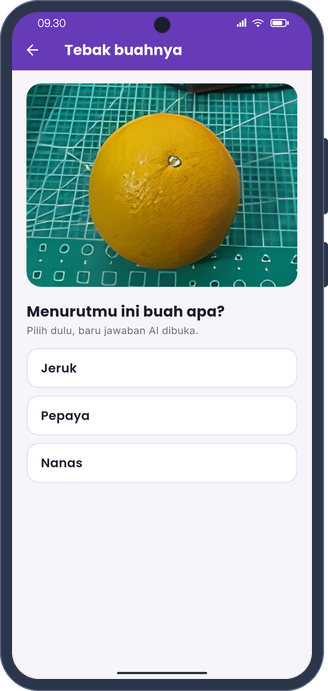
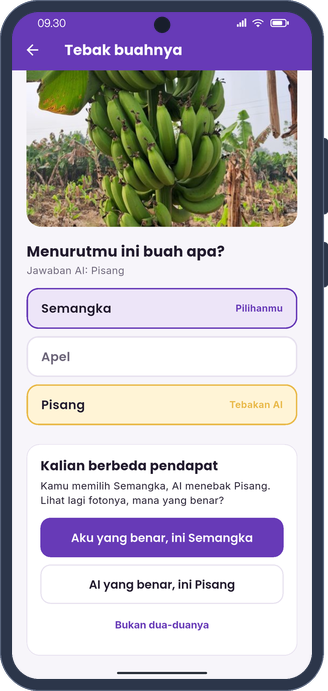
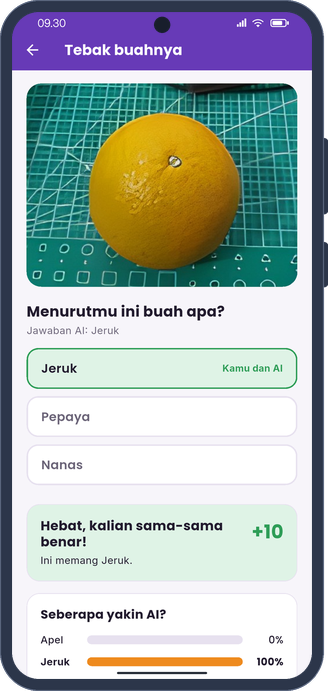
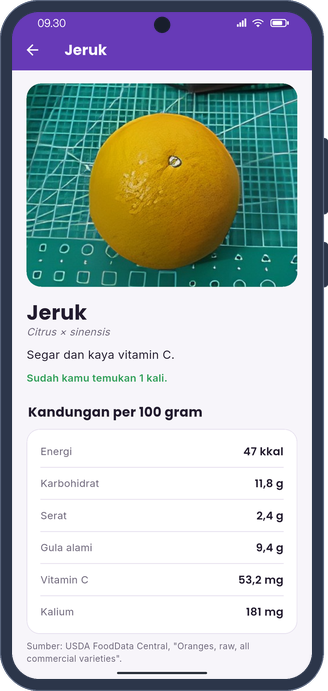
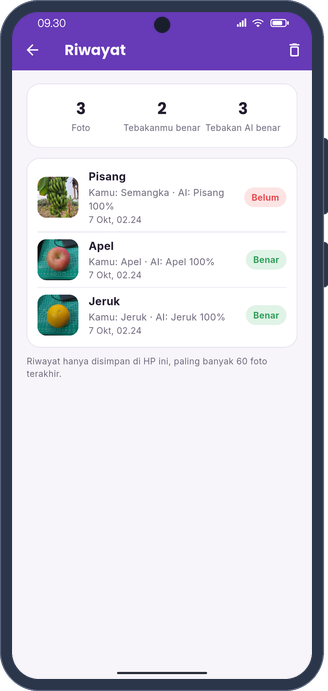
Buah-Seru is a fruit guessing game for children. A child takes a photo of an apple, orange, or banana and guesses its name first. After that, the AI shows its answer. If they disagree, the child decides who is right, and the app records how often the AI is correct. Each fruit has a card with nutrition facts per 100 g from USDA FoodData Central, benefits, and a fun fact. The CNN model was trained with TensorFlow and OpenCV and runs on the phone with TensorFlow Lite. Photos never leave the device.

Buah-Seru adalah permainan tebak buah untuk anak. Anak memotret apel, jeruk, atau pisang, lalu menebak namanya lebih dulu. Setelah itu, AI menunjukkan jawabannya. Jika jawabannya berbeda, anak yang menentukan mana yang benar, dan aplikasi mencatat seberapa sering AI tepat. Setiap buah punya kartu berisi kandungan gizi per 100 g dari USDA FoodData Central, manfaat, dan fakta menarik. Model CNN-nya dilatih dengan TensorFlow dan OpenCV, lalu dijalankan di ponsel dengan TensorFlow Lite. Foto tidak pernah keluar dari perangkat.

  • Guess-first quiz: the child against an on-device CNN (TF Lite)
  • Fruit cards with USDA nutrition facts
  • Points, streaks, and history kept only on the phone
  • Python
  • OpenCV
  • TensorFlow
  • TF Lite
  • CNN
  • Flutter
  • Dart
github.com/khaichi11/Aplikasi-Deteksi-Buah-CNN

App screenshots · Tangkapan layar aplikasi

Buah-Seru quiz asking the child to guess the fruit first
Guess first
Buah-Seru screen where the child decides who is right
Child vs AI
Buah-Seru result with points and AI confidence bars
Result and AI confidence
Buah-Seru orange card with nutrition per 100 grams
Fruit card
Buah-Seru history of guesses kept on the phone
History

Project 06

Robotiik Chassis

Sheet-Metal Mechanical Design · Autodesk Fusion 360

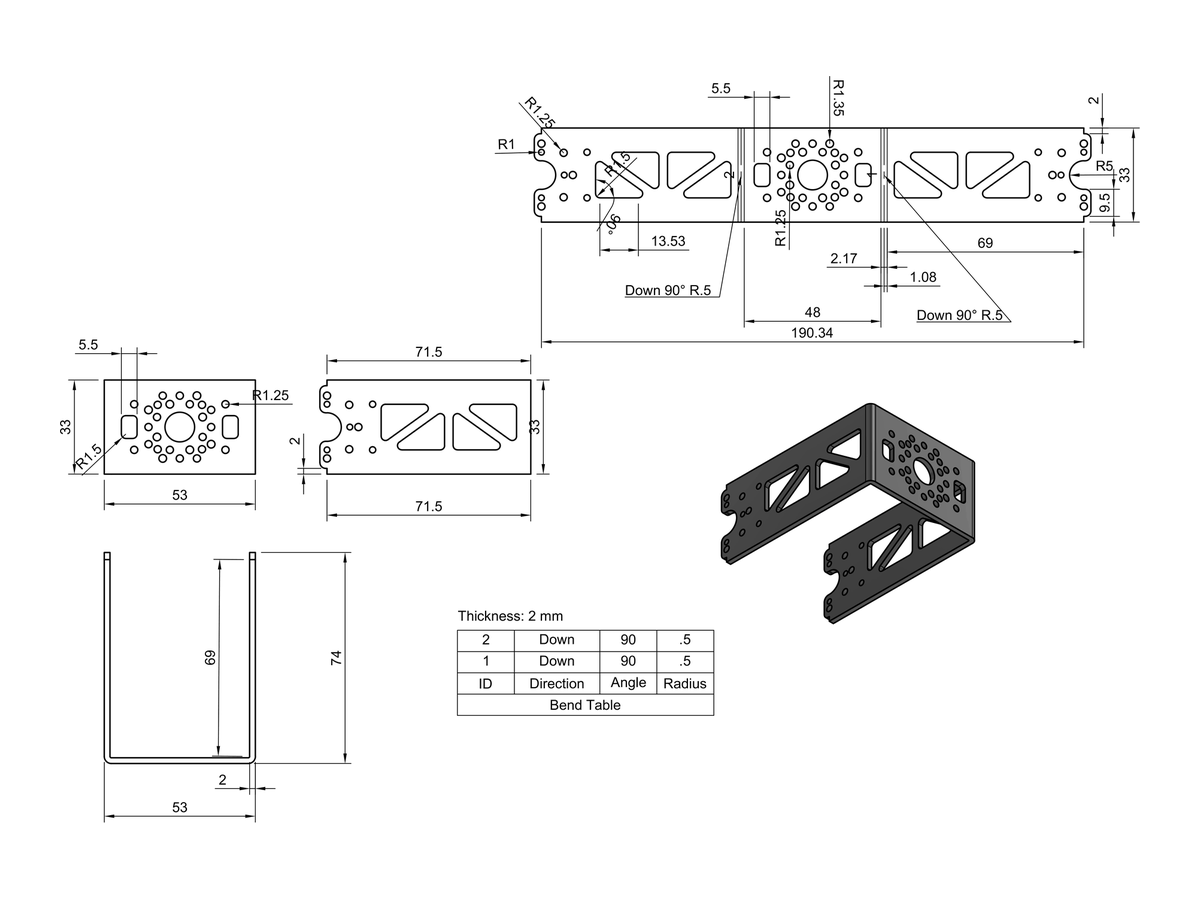
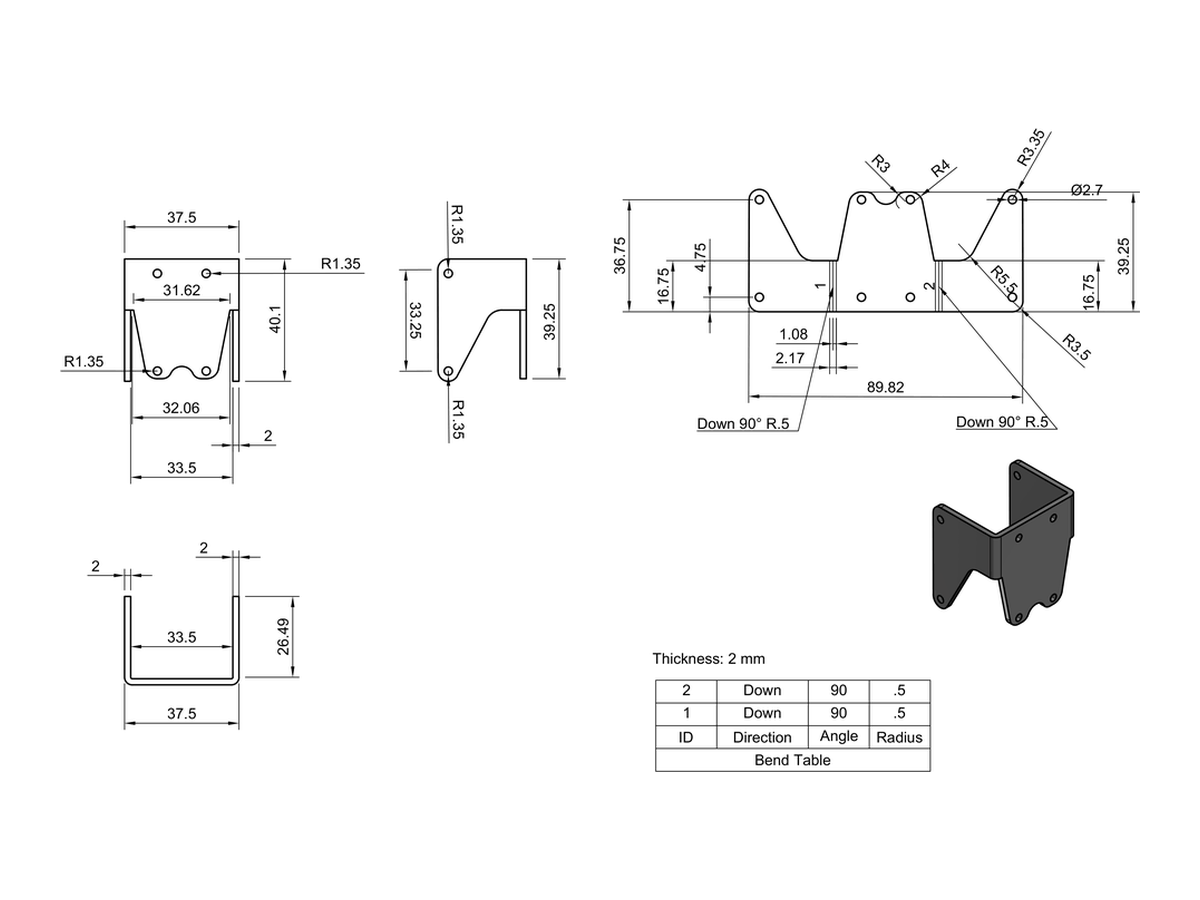
Technical drawing of the large servo mount, variant 2, with dimensions and a 3D view
Large servo mount · technical drawing

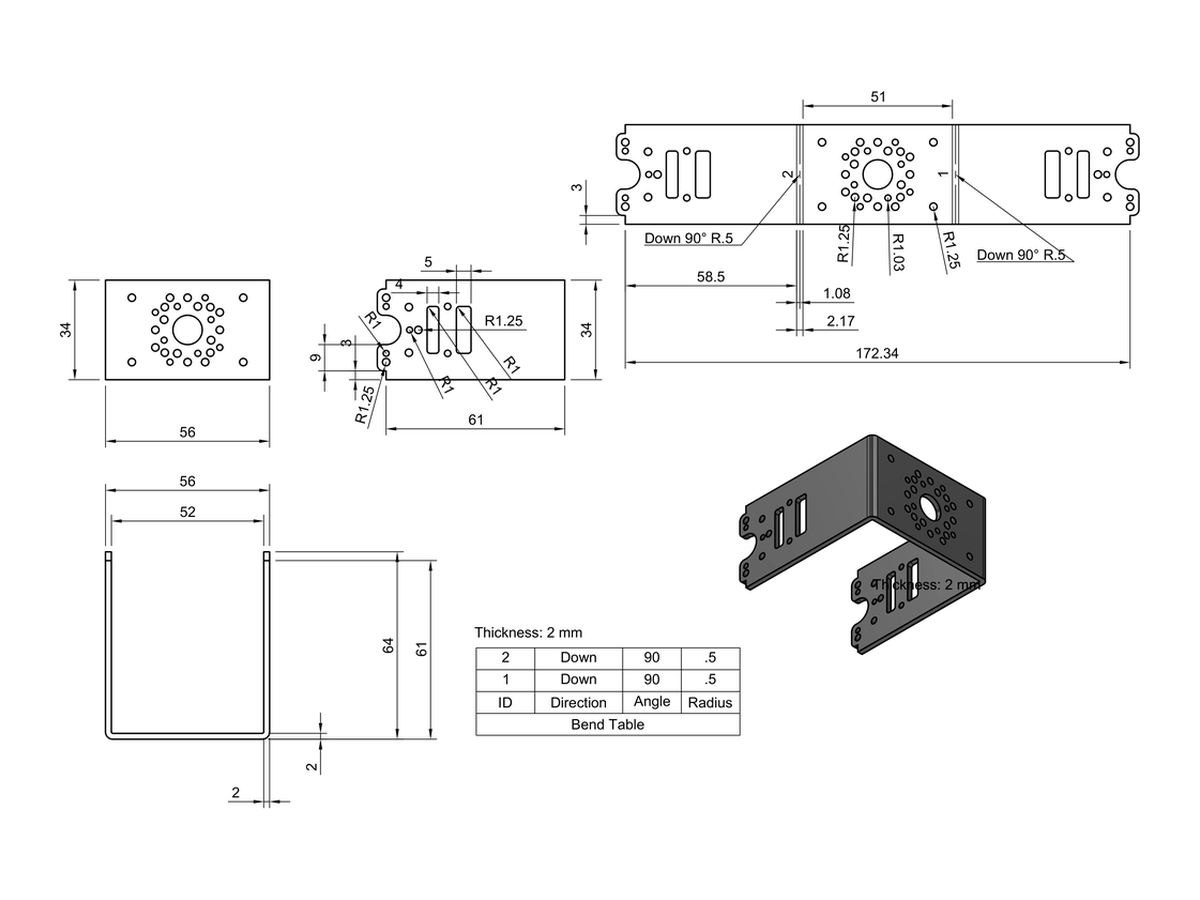
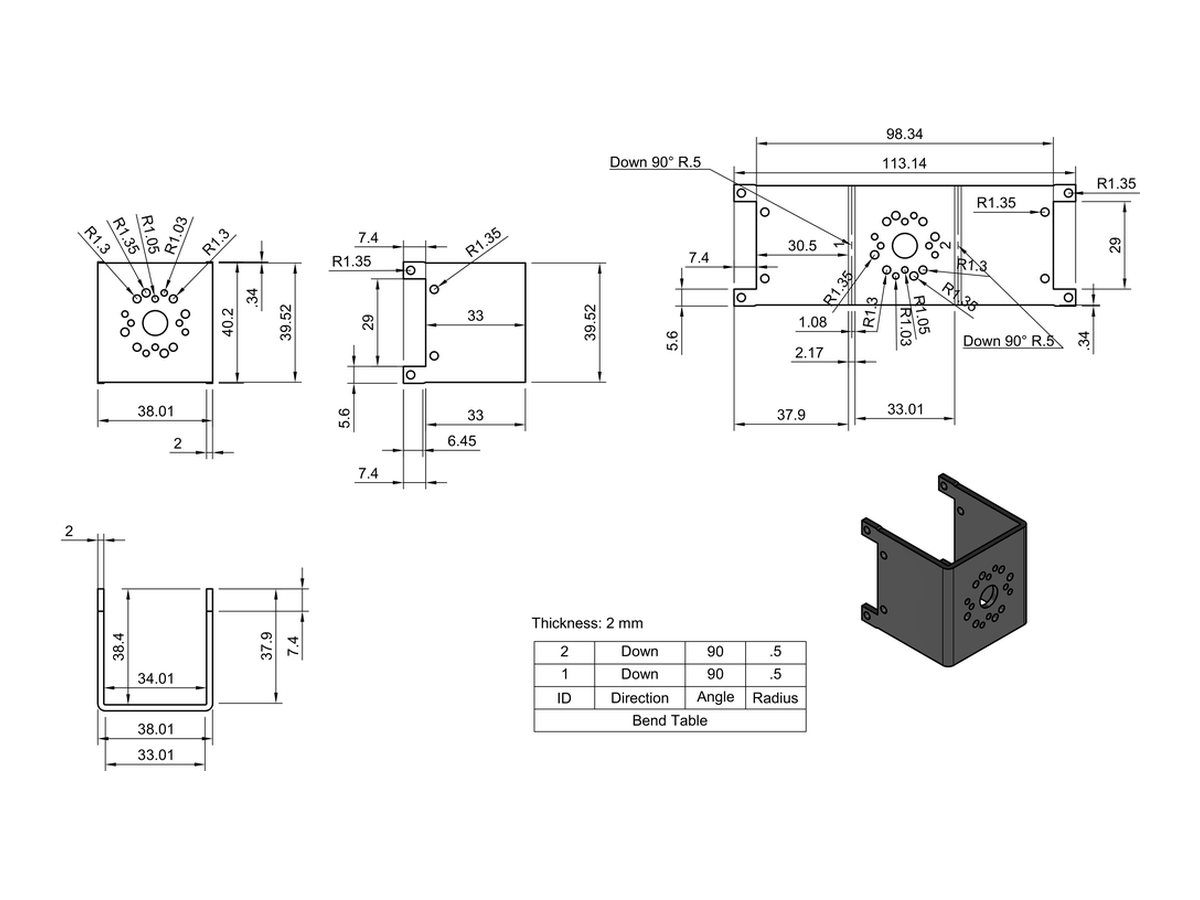
As Mechanical PIC at Robotiik, I worked on the chassis of our legged robot in Autodesk Fusion 360. I used Robotis' original design as a reference and changed several parts to fit the servos and onboard computer we use. All parts are sheet metal. The bend tables and flat patterns for fabrication were generated in Fusion 360.

Sebagai PIC Mekanik di Robotiik, saya mengerjakan sasis robot berkaki tim kami di Autodesk Fusion 360. Saya memakai desain asli Robotis sebagai acuan, lalu mengubah beberapa komponen agar sesuai dengan servo dan komputer onboard yang kami pakai. Semua komponen berbahan sheet metal. Bend table dan flat pattern untuk fabrikasi dibuat langsung dari Fusion 360.

  • Adapted Robotis' chassis in Fusion 360 to our servo and onboard-computer dimensions
  • Bend tables and flat patterns generated for fabrication
  • Full drawing set with orthographic and isometric views and dimensions
  • Autodesk Fusion 360
  • Sheet Metal
  • CAD
  • Mechanical Design
  • Technical Drawing

Documentation · Dokumentasi

Tempat Servo Besar 3: servo mount technical drawing
Large servo mount 3
Tempat Servo Besar 4: servo mount technical drawing
Large servo mount 4
Tempat Servo Besar Bawah: lower servo mount technical drawing
Lower servo mount

Project 07

Arrhythmia Classification

R-R Interval and QRS Duration with SVM

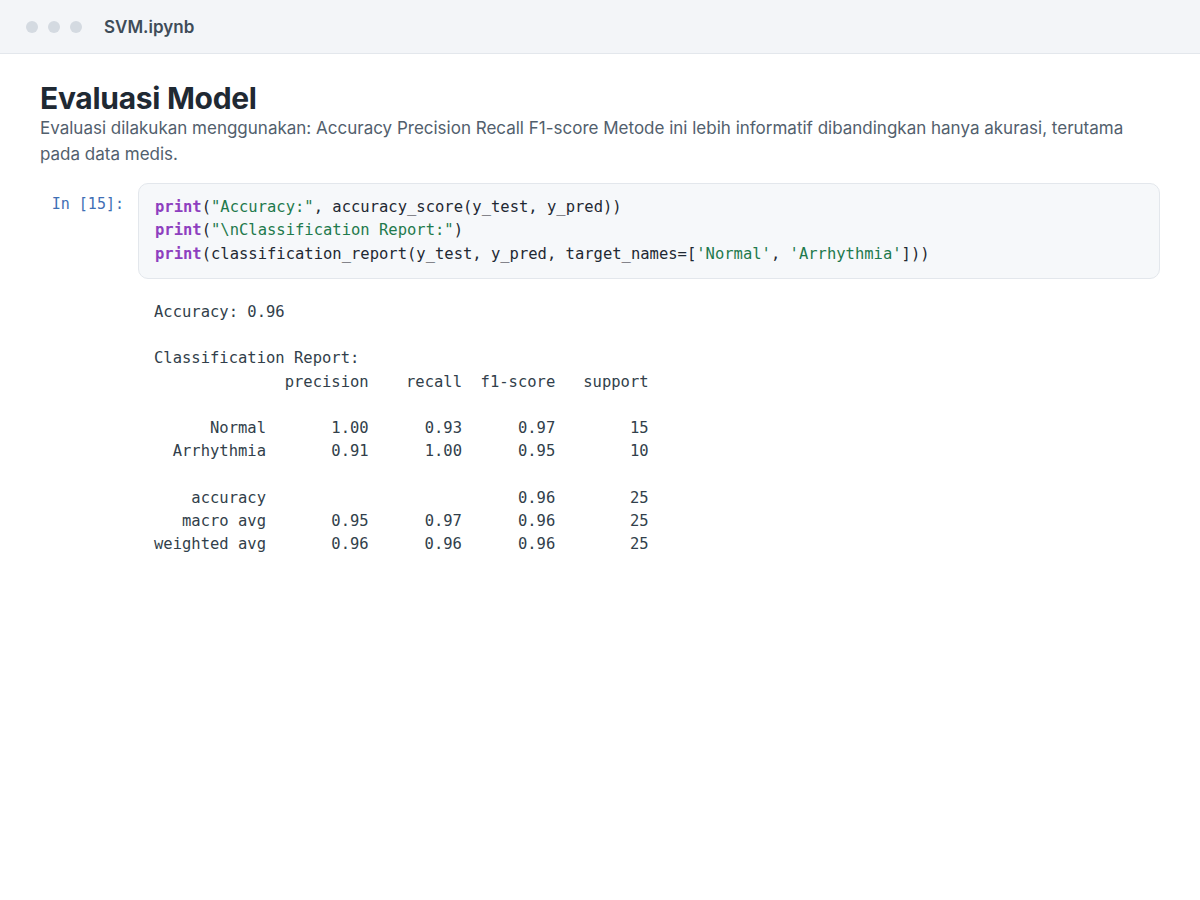
Notebook cell printing the SVM classification report with 96% accuracy
Evaluation · 96% accuracy on the test set

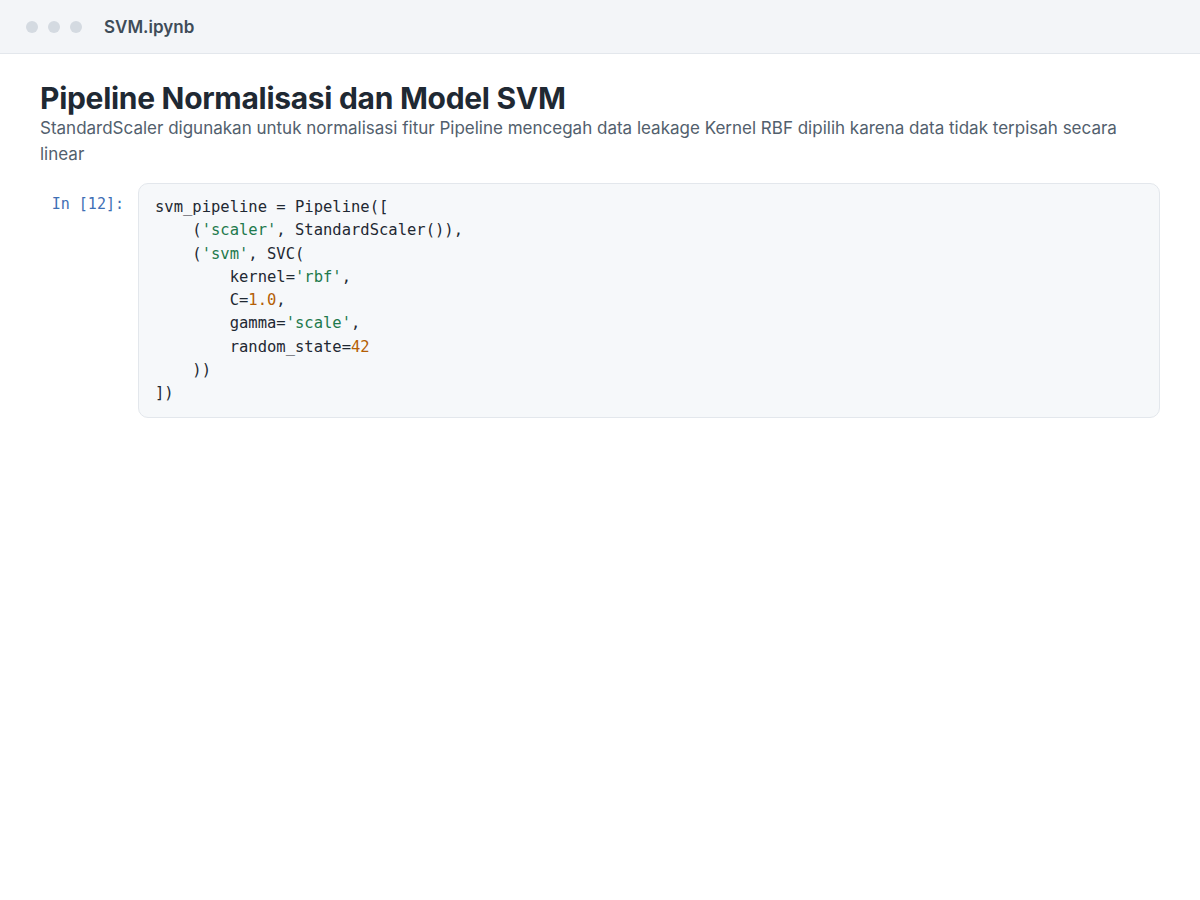
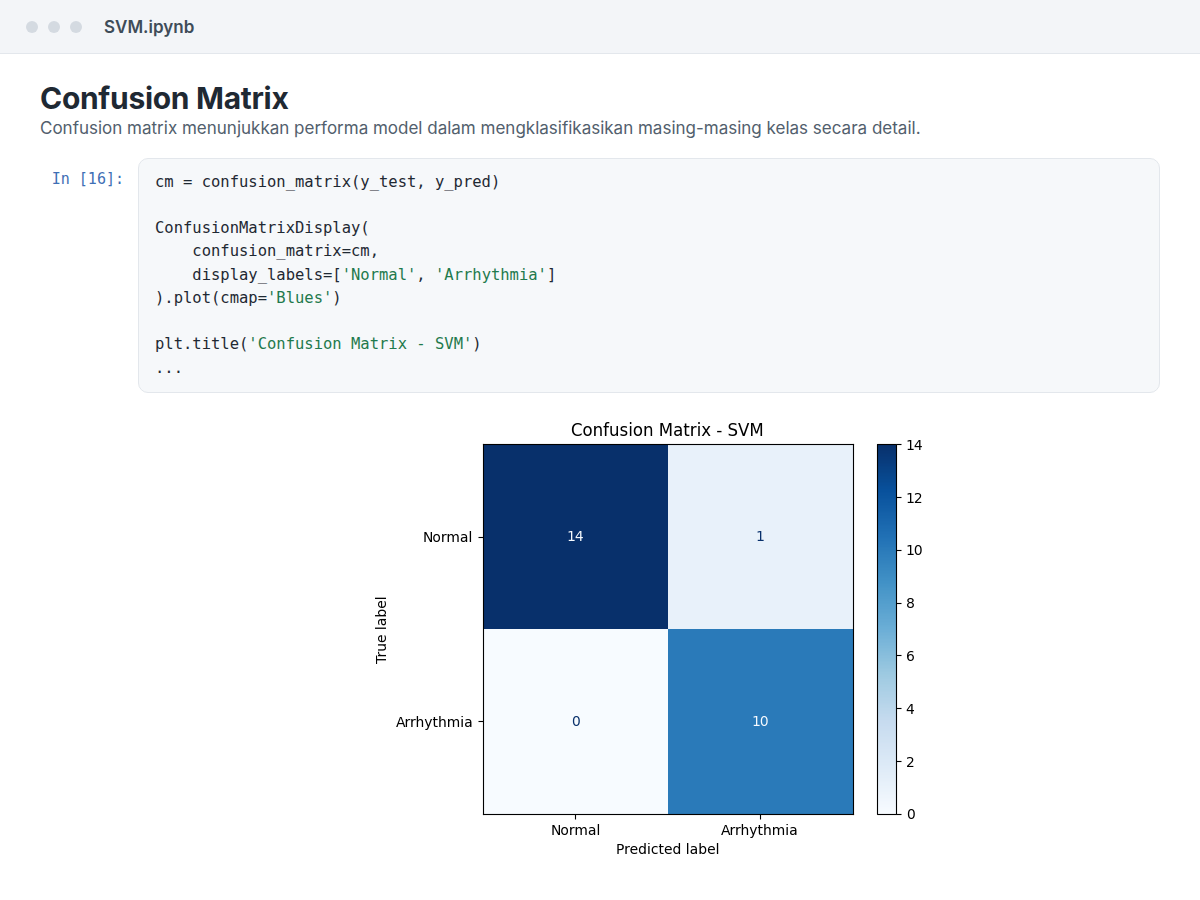
In this project, I trained an SVM model to tell normal heartbeats from arrhythmia. The model uses two features from ECG data, the R-R interval and the QRS duration. I started with exploratory data analysis, normalised the features, and built a scikit-learn pipeline. I then evaluated the model with a confusion matrix and a classification report. It reached 96% accuracy on the test set.

Pada proyek ini, saya melatih model SVM untuk membedakan detak jantung normal dan aritmia. Model ini memakai dua fitur dari data ECG, yaitu interval R-R dan durasi QRS. Saya memulai dengan eksplorasi data, menormalisasi fitur, lalu menyusun pipeline scikit-learn. Setelah itu, model saya evaluasi dengan confusion matrix dan classification report. Akurasinya mencapai 96% pada data uji.

  • 96% accuracy on the held-out test set
  • End-to-end ML pipeline with feature normalisation
  • EDA, confusion matrix, and classification report
  • Python
  • scikit-learn
  • pandas
  • NumPy
  • matplotlib
  • Anaconda
  • SVM
Code-on-College · SVM.ipynb

Documentation · Dokumentasi

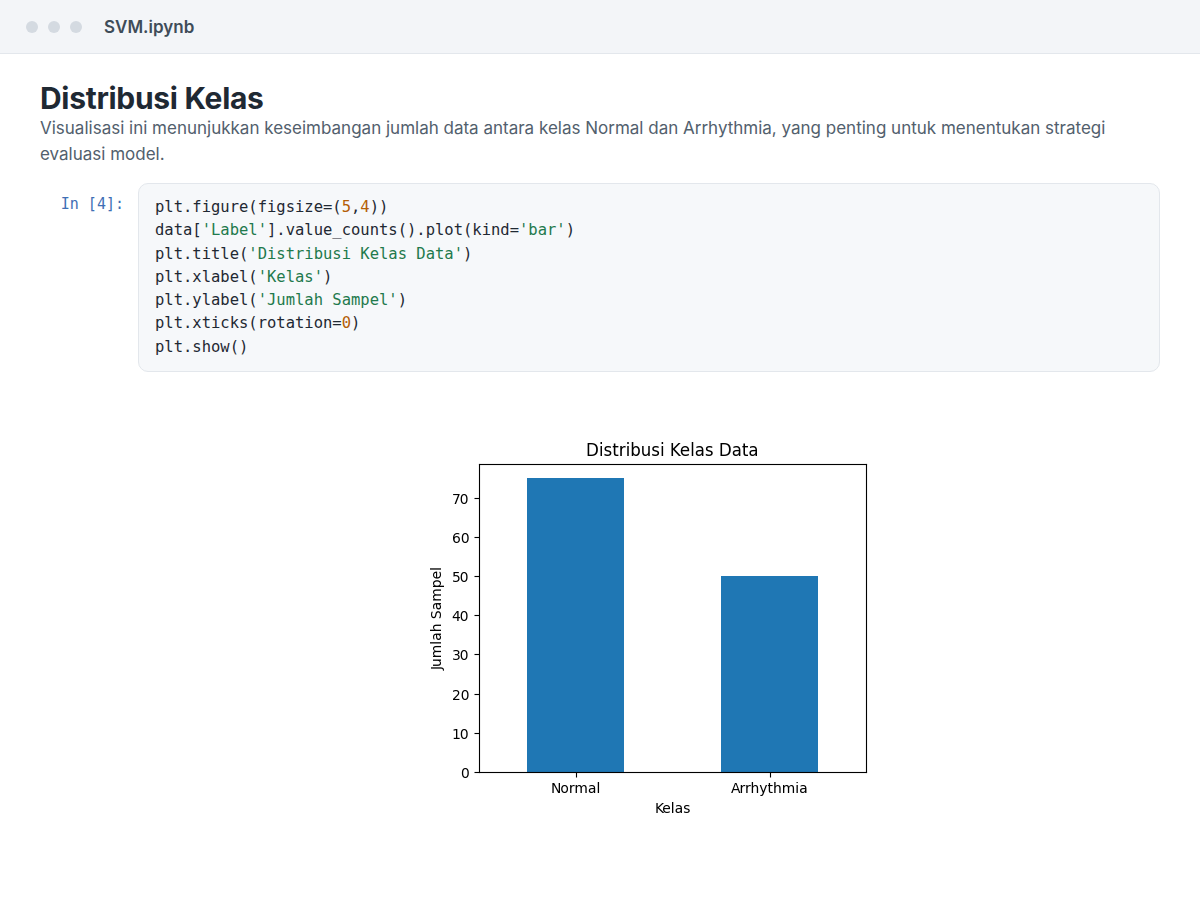
Class distribution chart from exploratory data analysis
Class distribution (EDA)
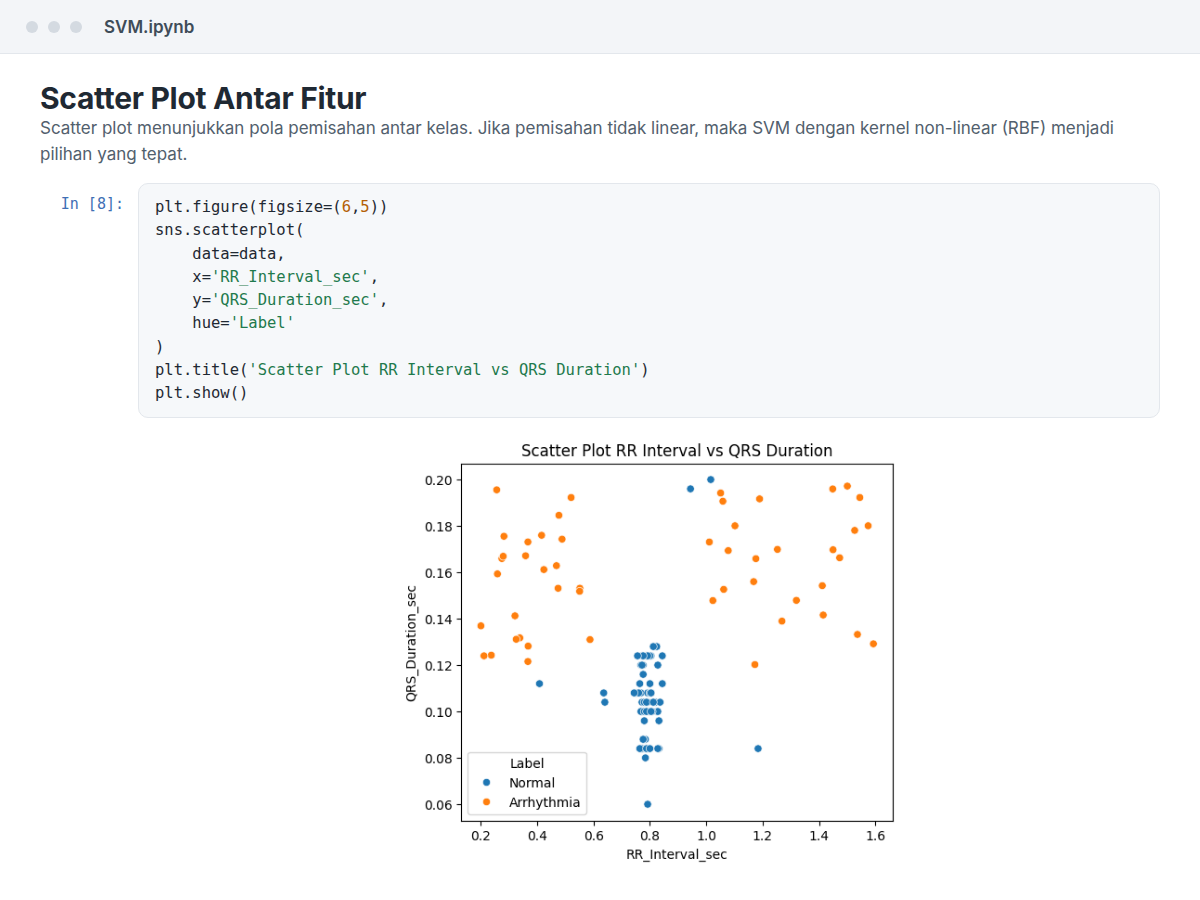
Feature scatter plot of R-R interval versus QRS duration
Feature scatter · RR vs QRS
Notebook cell building the StandardScaler and RBF SVM pipeline
Scaling and SVM pipeline
Confusion matrix for the SVM model
Confusion matrix · SVM

Project 08

K-Means from Scratch

Clustering for Waste Sorting · Implemented Manually

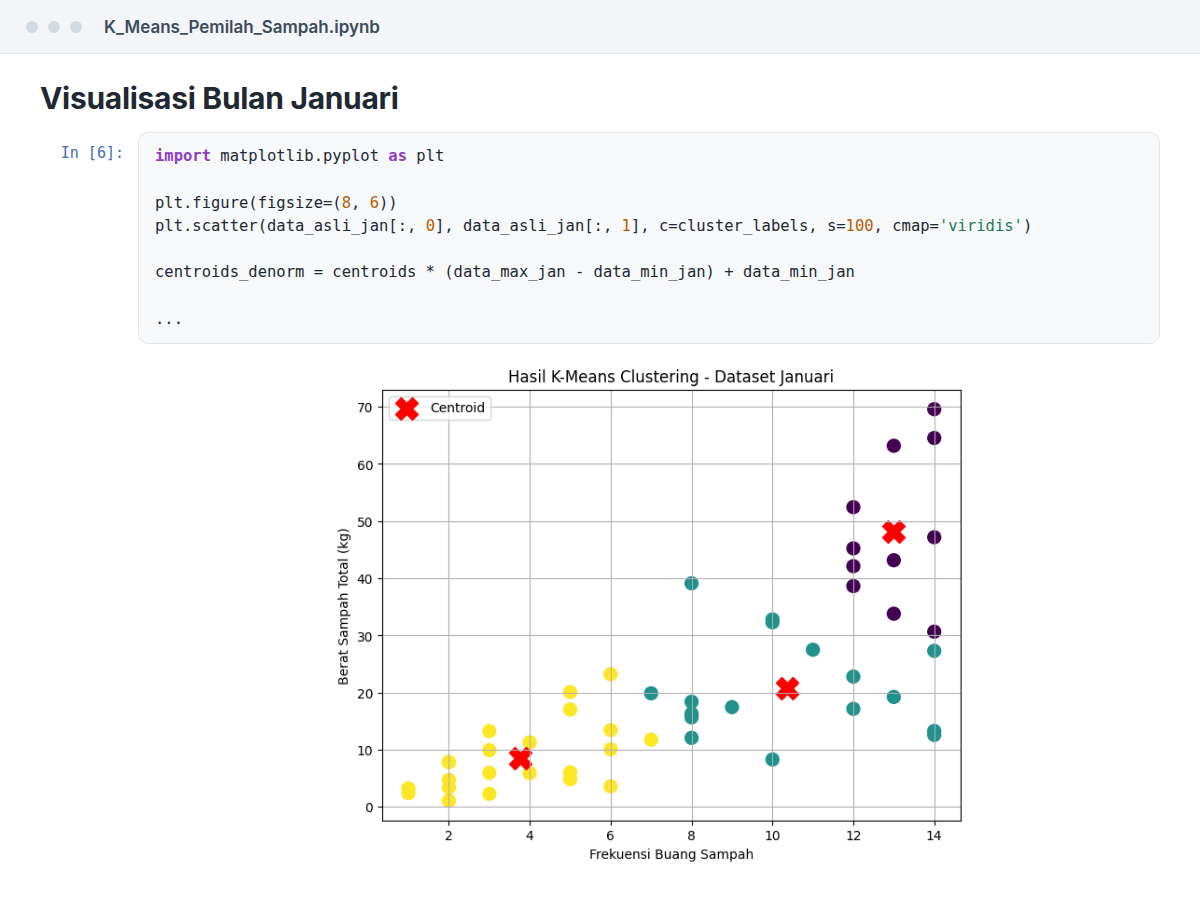
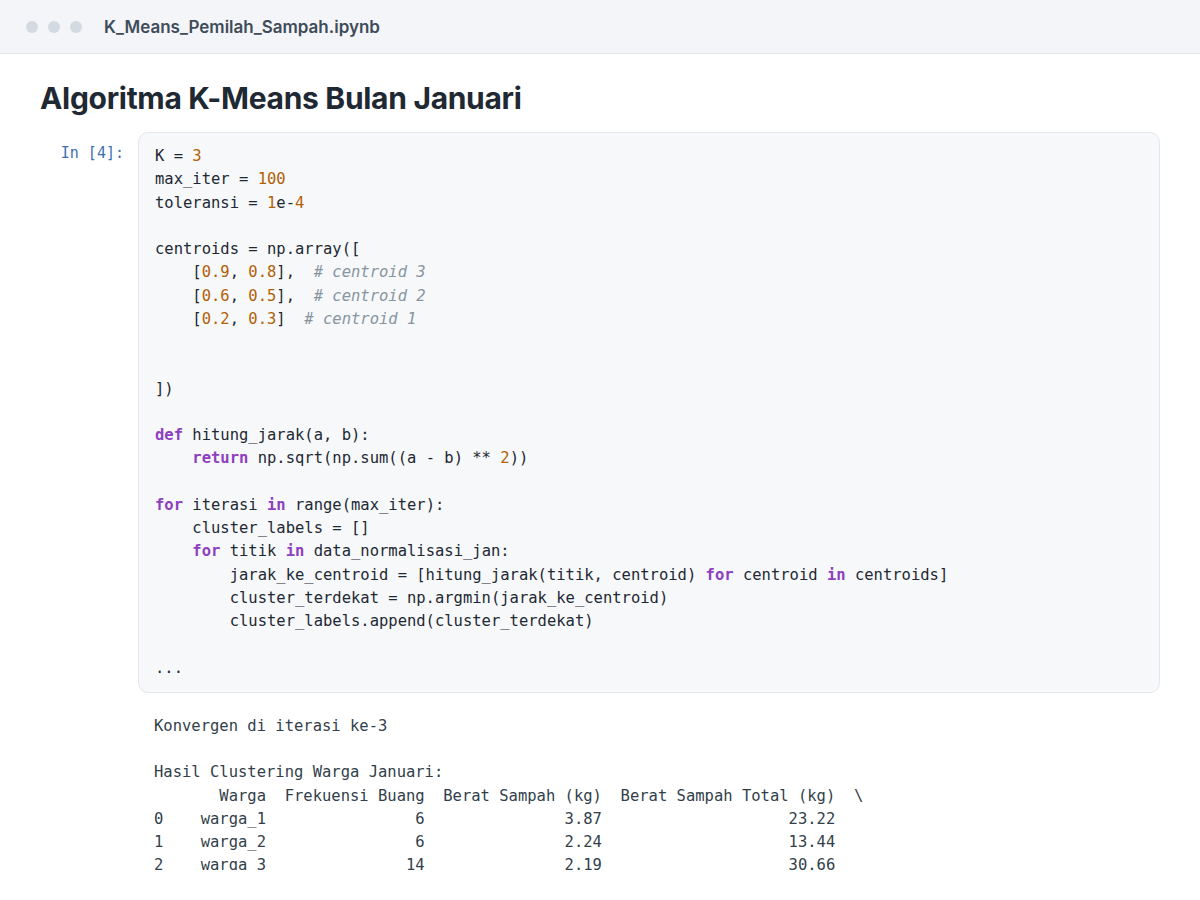
Notebook cell plotting the K-Means clusters for the January data
January clusters · K-Means from scratch

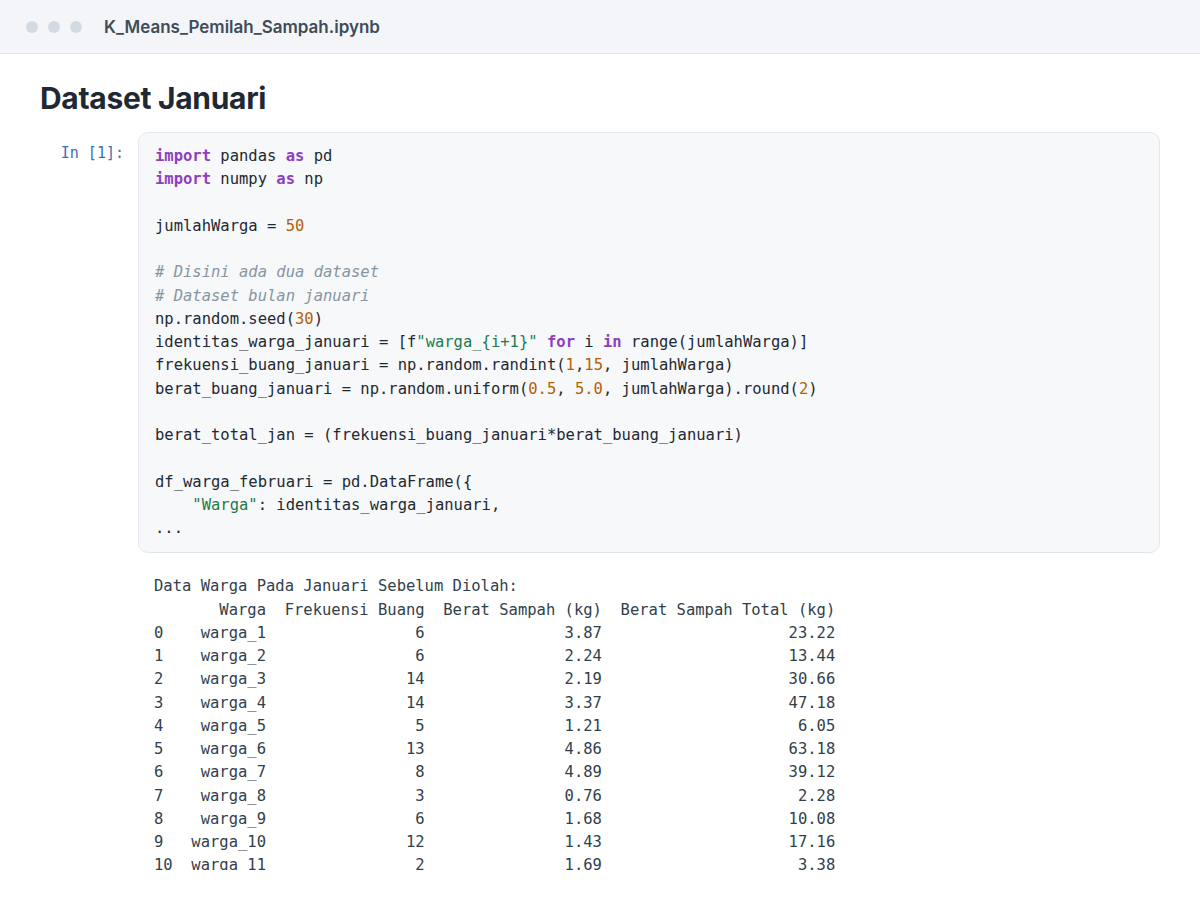
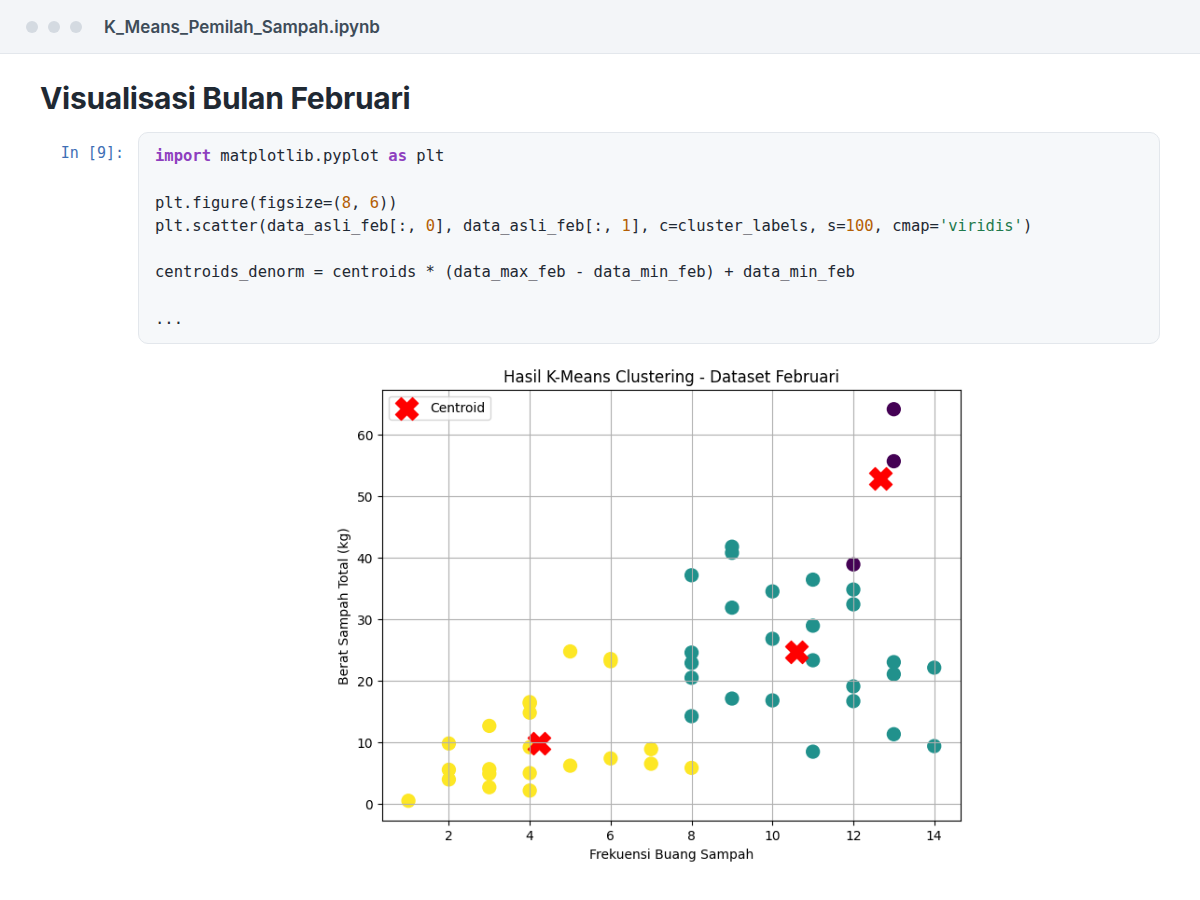
I implemented the K-Means algorithm from scratch in Python, without scikit-learn, to understand how it works. I used pandas and NumPy to process the data and calculate distances, and matplotlib to plot the clusters. From the plots, I looked at patterns in the waste-sorting data.

Saya membuat algoritma K-Means dari nol dengan Python, tanpa scikit-learn, untuk memahami cara kerjanya. Saya memakai pandas dan NumPy untuk mengolah data dan menghitung jarak, serta matplotlib untuk menampilkan klasternya. Dari grafik itu, saya melihat pola pada data pemilahan sampah.

  • K-Means implemented from scratch (no scikit-learn)
  • Vectorised distance computation with NumPy
  • Cluster visualisation & data-pattern analysis
  • Python
  • pandas
  • NumPy
  • matplotlib
  • Anaconda
  • From scratch
Code-on-College · K_Means_Pemilah_Sampah.ipynb

Documentation · Dokumentasi

Dataset construction code for the K-Means project
Dataset construction
Manual K-Means algorithm implementation
Manual K-Means algorithm
Clustering result for January
Clustering result · January
Clustering result for February
Clustering result · February

Certifications & Training

Always picking up something new.

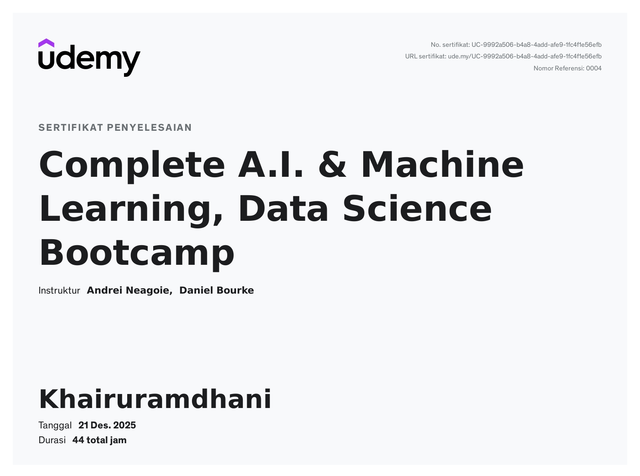
Udemy certificate — Complete A.I. & Machine Learning, Data Science Bootcamp
Complete A.I. & Machine Learning, Data Science BootcampUdemy
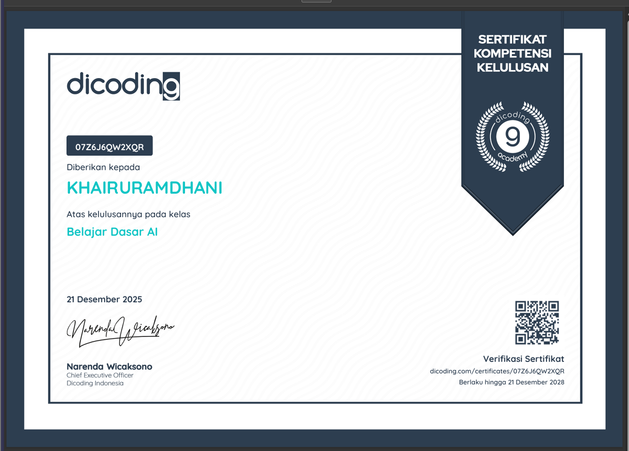
Dicoding certificate — Belajar Dasar AI
Belajar Dasar AIDicoding Indonesia
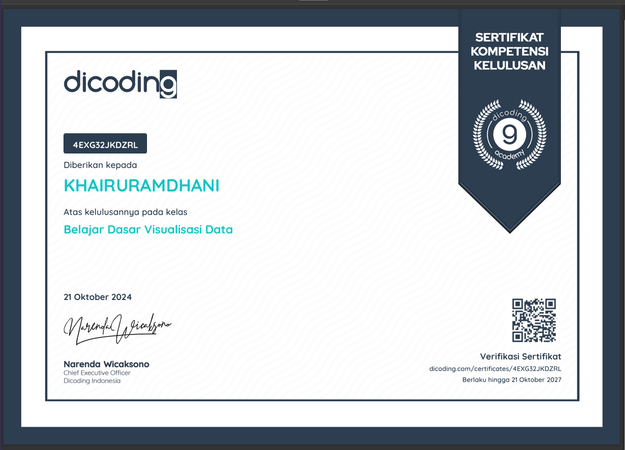
Dicoding certificate — Belajar Dasar Visualisasi Data
Belajar Dasar Visualisasi DataDicoding Indonesia
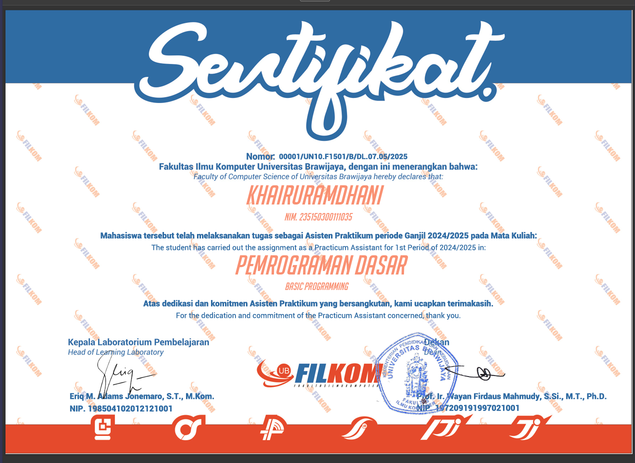
Teaching Assistant certificate — Basic Programming, FILKOM UB
Teaching Assistant · Basic ProgrammingFILKOM, Universitas Brawijaya
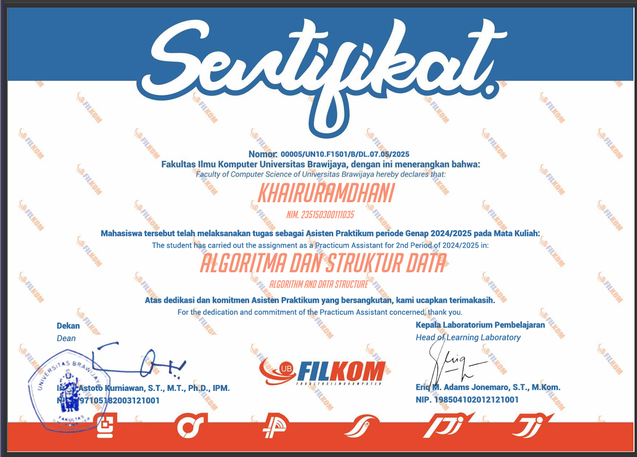
Teaching Assistant certificate — Data Structures & Algorithms, FILKOM UB
Teaching Assistant · Data Structures & AlgorithmsFILKOM, Universitas Brawijaya
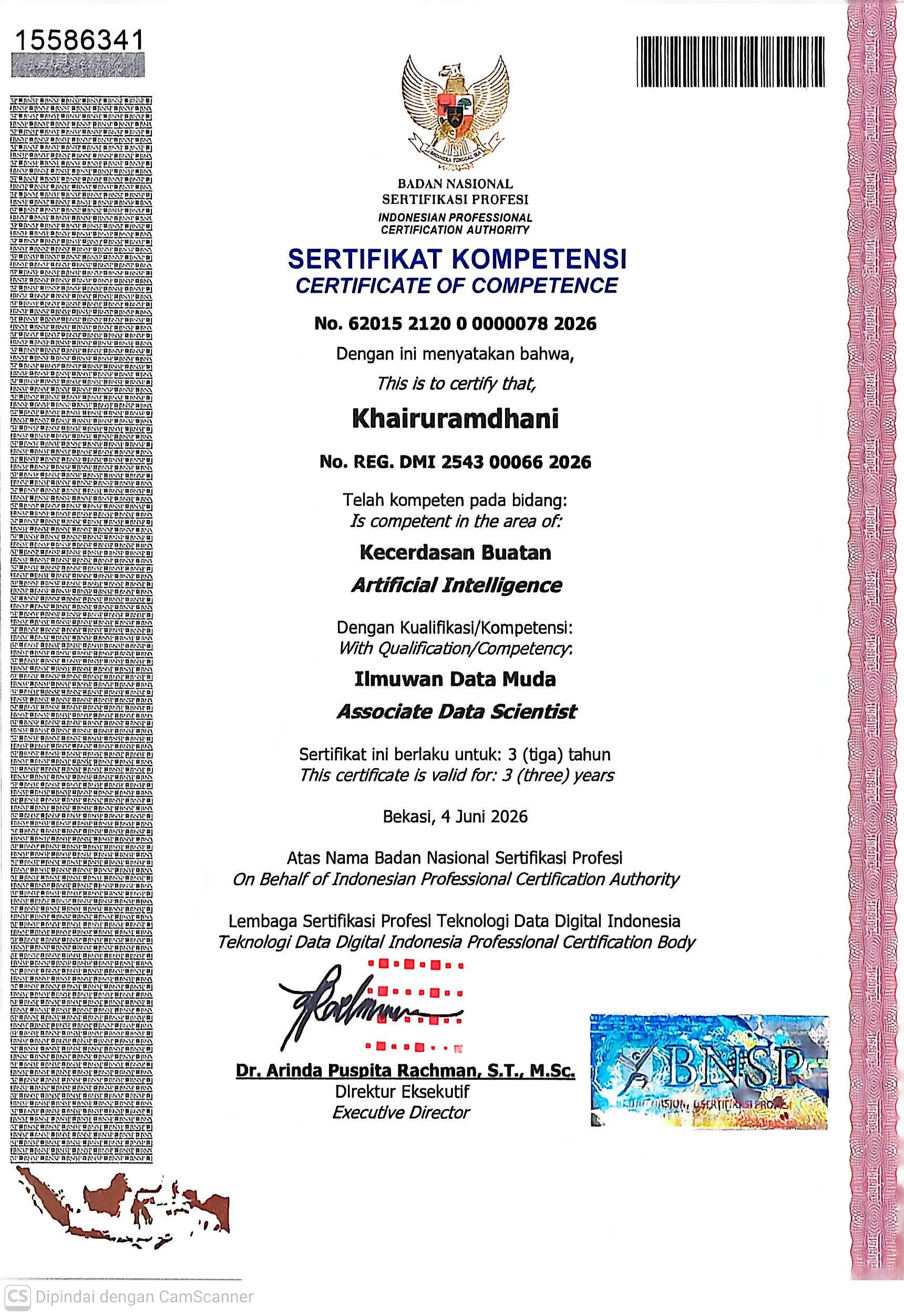
BNSP Certificate of Competence — Associate Data Scientist in Artificial Intelligence
Associate Data Scientist · Artificial IntelligenceBNSP · LSP Teknologi Data Digital Indonesia · 2026
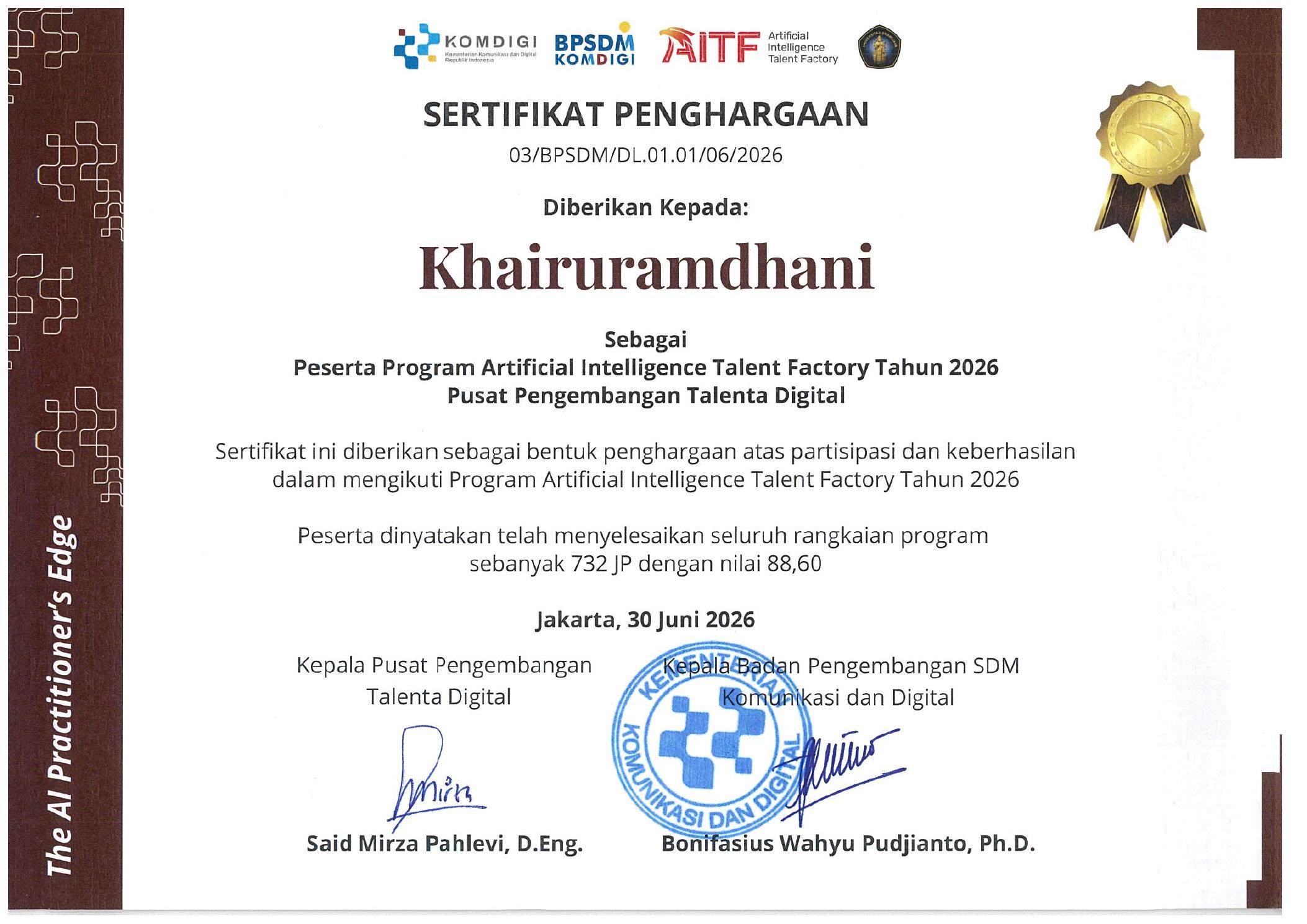
Official AITF Certificate of Appreciation — Artificial Intelligence Talent Factory 2026
Certificate of Appreciation · AITF 2026Komdigi · Digital Talent Development Centre · 732 learning hours · Score 88.60
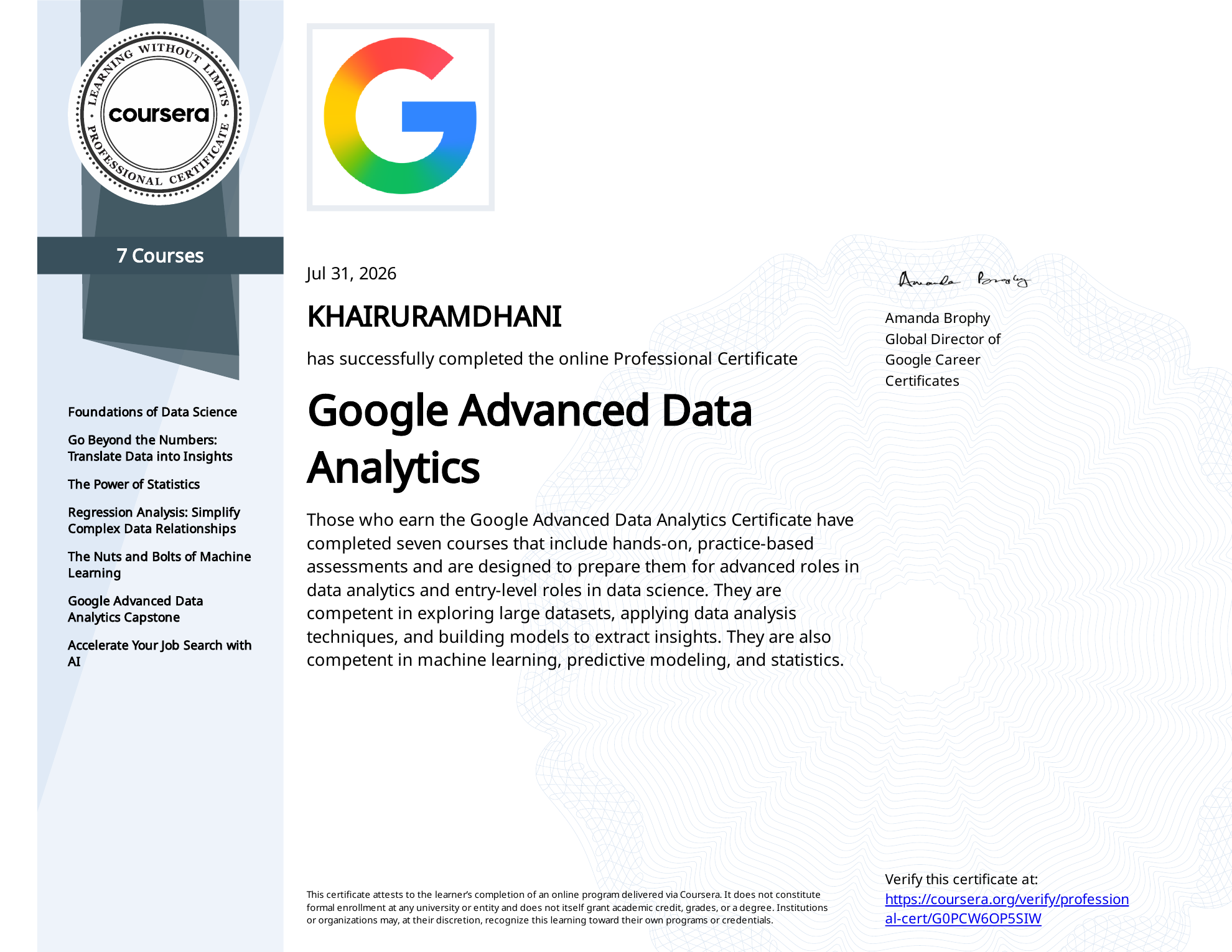
Coursera Professional Certificate — Google Advanced Data Analytics
Google Advanced Data AnalyticsCoursera · Google Career Certificates · 7 courses · 31 July 2026

Let's connect

Let's build something
together.

Or leave a message

Khai's Assistant Ask me about Khai
Welcome. I am Khai's portfolio assistant. Ask me about his skills, projects, experience, or how to contact him.